Harvest Information Screen
N93034-UN-16JUN11
N87833-UN-26FEB10
N93035-UN-11JUL11
Harvest Information Screen
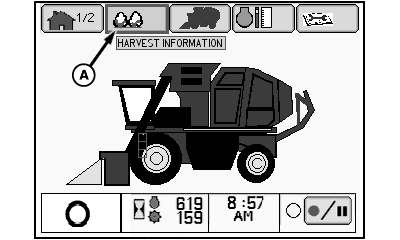
A - Harvest Information Tab
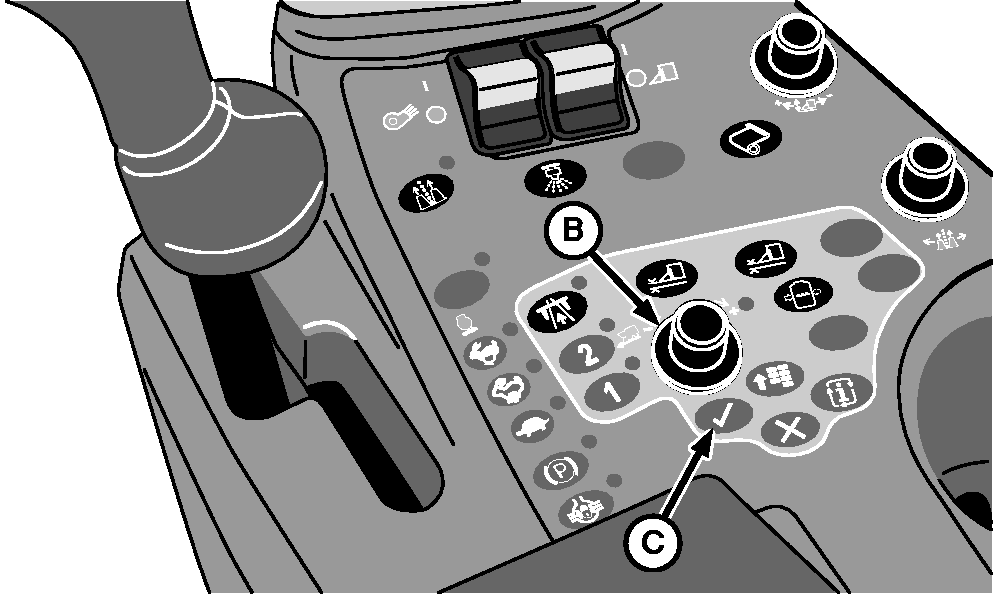
B - Selection Dial
C - Confirm Button
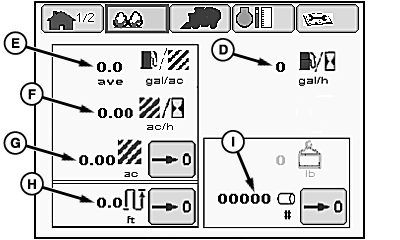
D - Fuel Consumption per Hour
E - Fuel Consumption per Area
F - Area per Hour
G - Area Counter
H - Distance Counter
I - Module Counter
NOTE: On machines equipped with the Harvest Doc™ system, performance information appears on the GreenStar™ display instead of the armrest display unit.
The harvest information screen displays the following performance information:
- Fuel consumption (volume per hour and unit area)
- Harvest rate (area per hour)
- Area counter and reset button
- Distance counter and reset button
- Module counter and reset button
NOTE: If machine is equipped with Harvest Monitor™ equipment, harvest information appears on the display provided with that system instead of the armrest display unit.
Open the harvest information screen as follows:
-
Highlight harvest information tab (A) using selection dial (B).
-
Press confirm button (C). Harvest information screen appears on display unit.
Area counter, distance counter, or module counter can be reset at any time. To reset counter, select counter icon using selection dial, then press confirm button.
|
Harvest Doc is a trademark of Deere & Company GreenStar is a trademark of Deere & Company Harvest Monitor is a trademark of Deere & Company |
DP99999,0000768-19-20120229 |