Machine Configuration Screens
The machine configuration screens allow the operator to view and change the following settings:
- Wrap portions per module
- Target module size
- Compactor mode
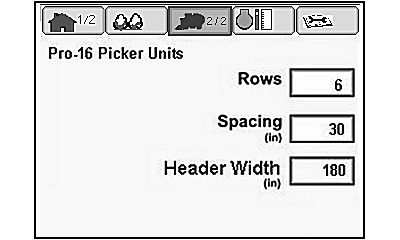
- Row spacing
Open the machine configuration screen and change settings as follows:
-
N93036-UN-16JUN11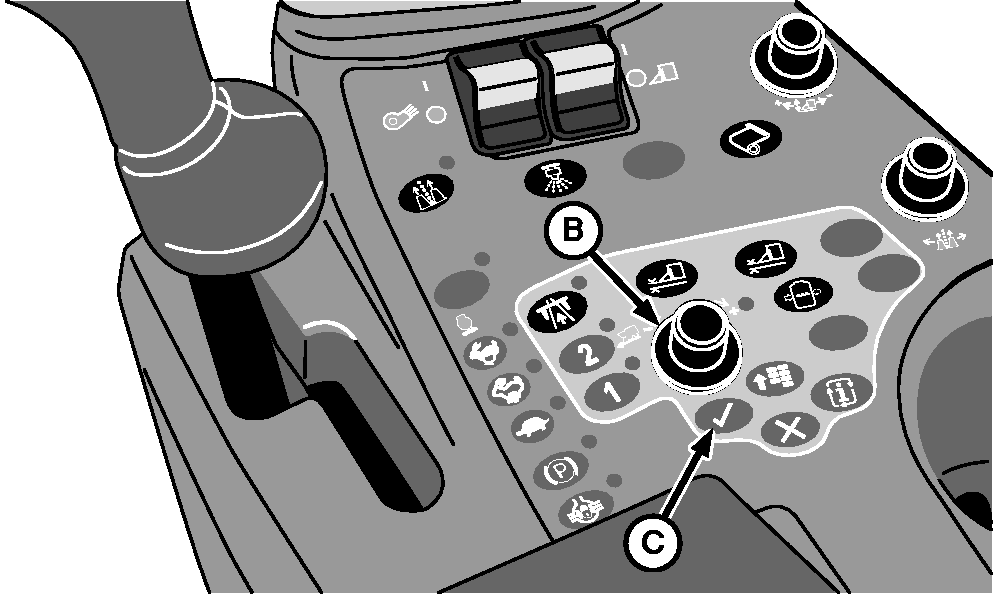
N87833-UN-26FEB10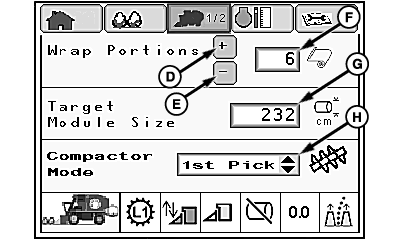
N93037-UN-21JUN11Machine Configuration Screen 1
N93038-UN-17JUN11Machine Configuration Screen 2
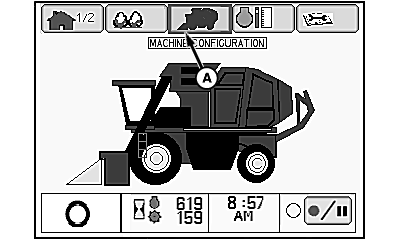
A - Machine Configuration Tab
B - Selection Dial
C - Confirm Button
D - Plus Icon
E - Minus Icon
F - Wrap Portions Setting
G - Module Size Setting
H - Compactor Mode Setting
Highlight machine configuration tab (A) using selection dial (B). -
Press confirm button (C). Machine configuration screen 1 appears on display.
-
Change wrap portions setting (F) as follows:
-
Using selection dial, highlight plus icon (D) to increase wrap portions or minus icon (E) to decrease wrap portions.
-
Press confirm button to increment setting
-
Another method is to highlight wrap portions setting (F) and rotate selection dial to change the value.
-
-
To change target module size, highlight module size setting (G) and rotate selection dial to obtain desired setting.
-
To change compactor mode, highlight compactor mode setting (H) and press confirm button. Highlight desired setting on drop-down list and press confirm button again. Compactor modes are:
- First Pick: Compactor auger cycles on periodically while filling accumulator and is on continuously when emptying accumulator.
- Second Pick: Compactor auger operates only when emptying accumulator.
-
NOTE: Row unit configuration data is used to determine header width. Header width is used for calculation of productivity data for display on harvest information screen.
To view or change row unit configuration settings, highlight machine configuration tab at top of screen and press confirm button. Machine configuration screen 2 appears on display.
|
DP99999,000076A-19-20110711 |