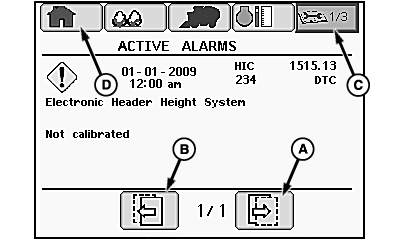
Active Alarms Screen
N93046-UN-20JUN11
A - Next Icon
B - Previous Icon
C - Diagnostics and Calibration Tab
D - Home Tab
This screen or series of screens displays all currently active diagnostic trouble codes. The page number of the screen currently displayed and the total number of alarm screens currently active is displayed at the bottom of each screen.
To scroll through the list of trouble codes, select next icon (A) or previous icon (B) and press confirm button on control console.
To return to the main diagnostics and calibration screen, select diagnostics and calibration tab (C) and press confirm button. To return to home page, select home tab (D) and press confirm button.
|
DP99999,000076C-19-20110622 |