Diagnostic Readings Screens
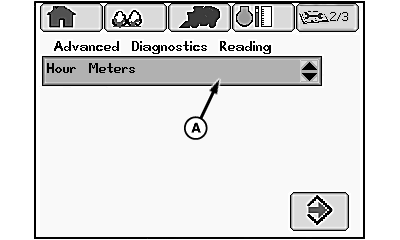
N93047-UN-20JUN11
Diagnostic Readings Main Screen
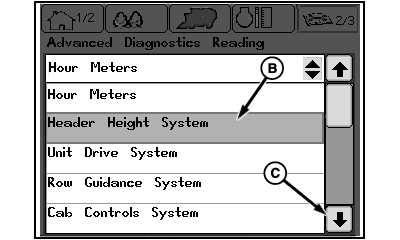
N95856-UN-20DEC11
Subsystem Drop-down List
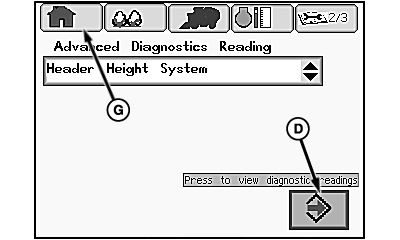
N93048-UN-20JUN11
Subsystem Selection
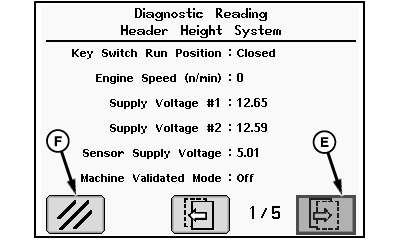
N85529-UN-13AUG09
Diagnostic Readings Page
A - Drop-down Box
B - Subsystem
C - Down Arrow
D - Enter Icon
E - Next Page Icon
F - Clear Icon
G - Home Icon
The diagnostic readings main screen consists of a drop-down menu which provides access to the following machine subsystems.
- Hour Meters
- Header Height System
- Unit Drive System
- Row Guidance System
- RMB Transport Mode System
- RMB Forming System
- RMB Wrap Eject System
- RMB RFID System
- RMB Interlocks System
- Fan and Chassis System
- Lube and Water System
- Engine Controls System
Once a subsystem is selected, a series of screens containing detailed operating information about that subsystem can be accessed. This information includes switch settings, sensor output data, and operating parameter settings.
Navigate through the diagnostic readings screens as follows:
-
At the diagnostics readings main screen, highlight drop-down box (A) using selection dial on control console.
-
Press confirm button and subsystem drop-down list appears.
-
Rotate selection dial to highlight desired subsystem (B). If desired subsystem is not shown, highlight down arrow (C) and press confirm button to scroll down the subsystem list.
-
When desired subsystem is highlighted, press confirm button to select subsystem. Subsystem name appears in drop-down box.
-
Highlight enter icon (D) and press confirm button to access the first diagnostic readings page.
-
The page number of the readings screen currently displayed and the total number of pages available for the selected subsystem are shown at the bottom of the screen. To select the next readings page, highlight next page icon (E) and press confirm button.
-
To exit the diagnostic readings screen, select clear icon (F) and press confirm button. Display then returns to diagnostic readings main screen.
-
Select home icon (G) and press confirm button to return to home screen.
|
DP99999,000076D-19-20111220 |