Diagnostic Trouble Codes Information Screens
N93101-UN-23JUN11
N93051-UN-24JUN11
Main Menu Screen
N93053-UN-23JUN11
Message Center Screen-Active Codes
N93160-UN-23JUN11
Message Center Screen-Control Units
N93161-UN-24JUN11
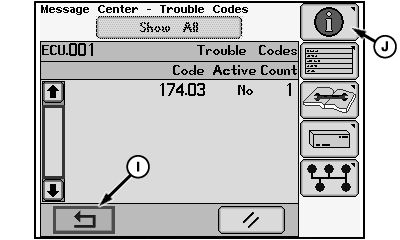
Message Center Screen-Active and Stored Codes
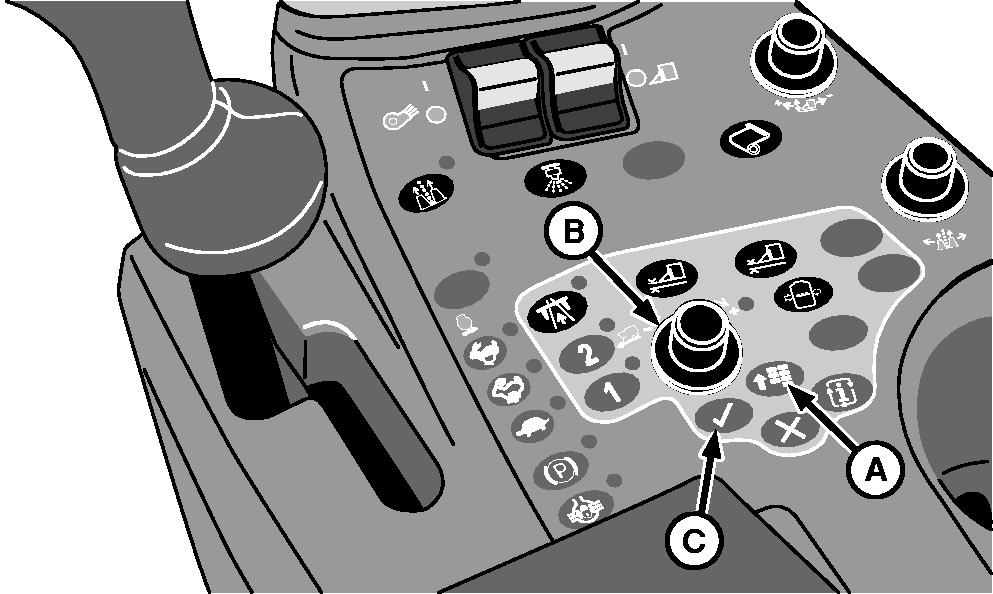
A - Main Menu Button
B - Selection Dial
C - Confirm Button
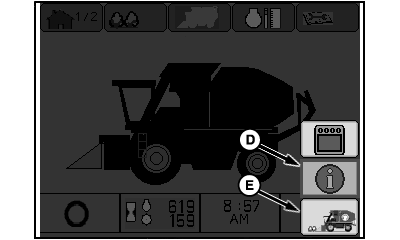
D - Information Icon
E - Home Icon
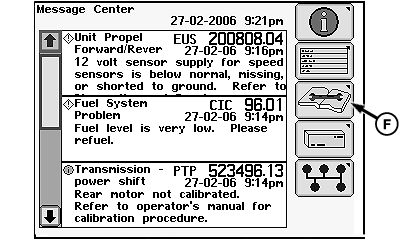
F - Trouble Codes Icon
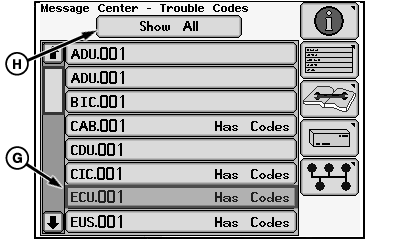
G - Control Unit Designator
H - Show All Button
I - Return Icon
J - Information Icon
Display Active Trouble Codes
-
Press main menu button (A) on control console to access menu screen.
-
Rotate selection dial (B) to highlight information icon (D).
-
Press confirm button (C) to display all active trouble codes on message center screen.
-
Press main menu button on console to return to menu screen. Select home icon (E) and press confirm button to return to home screen.
Display Active and Stored Trouble Codes
-
Press main menu button (A) on control console to access menu screen.
-
Select information icon (D) and press confirm button to display active trouble codes on message center screen.
-
Select trouble codes icon (F) and press confirm button to display list of control units on message center screen. Control units with active or stored codes are identified in the list.
-
Select a control unit designator (G) or the show all button (H) and press confirm button. The message screen displays all active and stored codes for the selected control unit or the machine. The message screen also shows whether each code is active or stored and the number of occurrences of each stored code.
-
Select return icon (I) and press confirm button to go back to the previous screen. Select information icon (J) and press confirm button to go to active codes message screen.
|
DP99999,0000772-19-20120202 |