Multifunction Control Handle Buttons
NOTE: Moistener system flush can also be actuated using button on armrest control console.
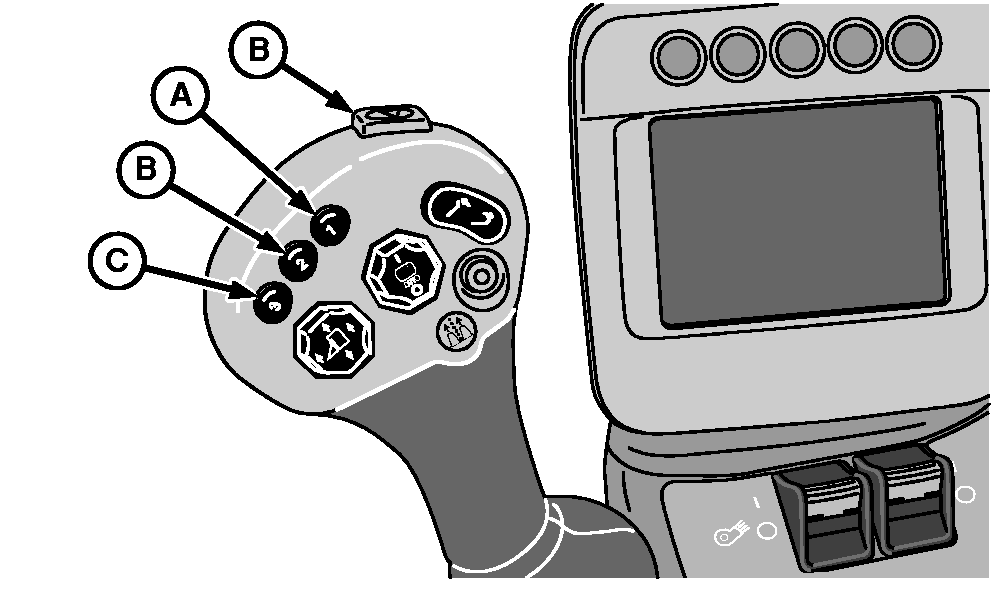
N92903-UN-16JUN11
A - Moistener Flush Button
B - Unused Button
C - Camera View Button
Press button (A) to actuate moistener system flush. (See USING MOISTENER FLUSH SYSTEM in Moistener System section.)Buttons (B) are not used.
On machines equipped with rear camera option, press button (C) to toggle between available camera views. The normal view is from the camera mounted on the upper rear of the machine. When camera view button is pressed, the view changes to the alternate camera after a delay of 10—15 seconds. The alternate view appears for approximately 10 seconds, then reverts to the normal view. See REAR CAMERA SYSTEM in this section for more information.
|
DP99999,000077C-19-20120206 |