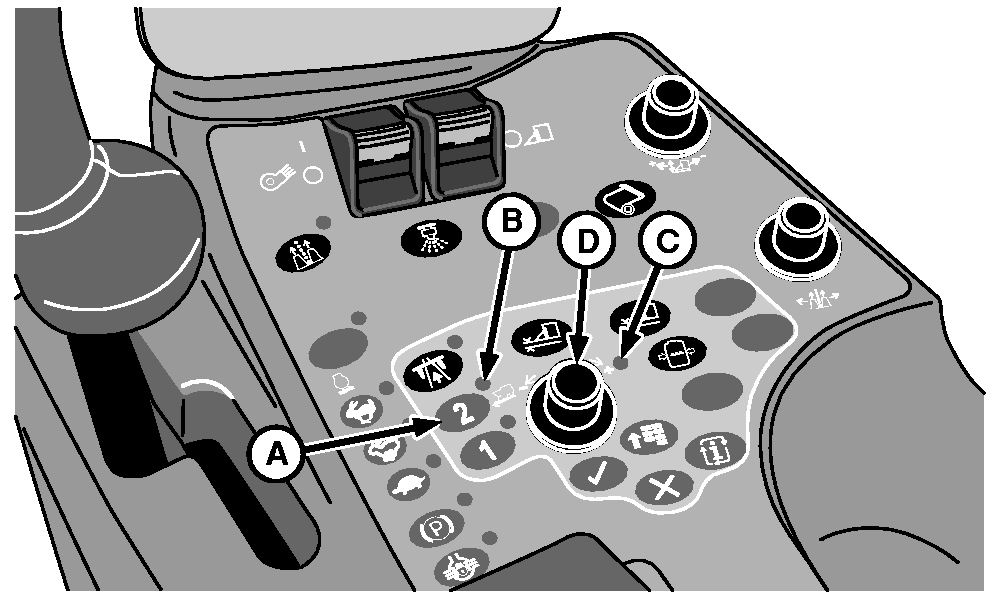
Transmission Mode 2 Button
N93365-UN-06JUL11
N93367-UN-06JUL11
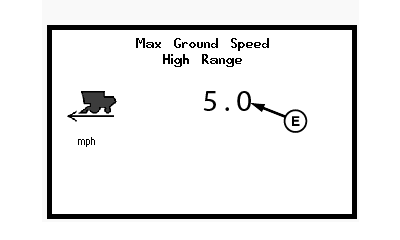
High Range Max Speed Setting Screen
A - Transmission Mode 2 Button
B - Indicator Light
C - Indicator Light
D - Selection Dial
E - Maximum Ground Speed Setpoint
Press transmission mode 2 button (A) to operate machine in high speed range. Indicator light (B) comes on when this mode is selected.Field Mode In mode 2 (high range), the machine can travel at speeds up to 8.0 km/h (5.0 mph). Actual speed depends on engine speed setting, multifunction control handle position, and high range maximum speed setpoint. When control handle is moved fully forward, ground speed increases to setpoint value.
Road Mode In mode 2 (high range), the machine can travel at speeds up to 27.4 km/h (17.0 mph). Actual speed depends on engine speed setting and multifunction control handle position.
Set maximum low range ground speed as follows:
-
Press and hold transmission mode 2 button (A) for 2 seconds. High range setpoint adjustment screen appears on armrest display unit (ADU). Indicator light (C) comes on.
-
Rotate selection dial (D) clockwise toward plus (+) symbol to increase maximum speed setpoint (E). Rotate dial counterclockwise toward minus (-) symbol to decrease setpoint.
|
DP99999,000079A-19-20110706 |