Harvesting in Auto Mode
 CAUTION: Sudden machine movement can cause serious injury or
death to bystanders. ALWAYS be sure that no one is standing on or
near machine before starting.
CAUTION: Sudden machine movement can cause serious injury or
death to bystanders. ALWAYS be sure that no one is standing on or
near machine before starting.
-
N88160-UN-23MAR10
N88161-UN-23MAR10Round Module Builder Status Display
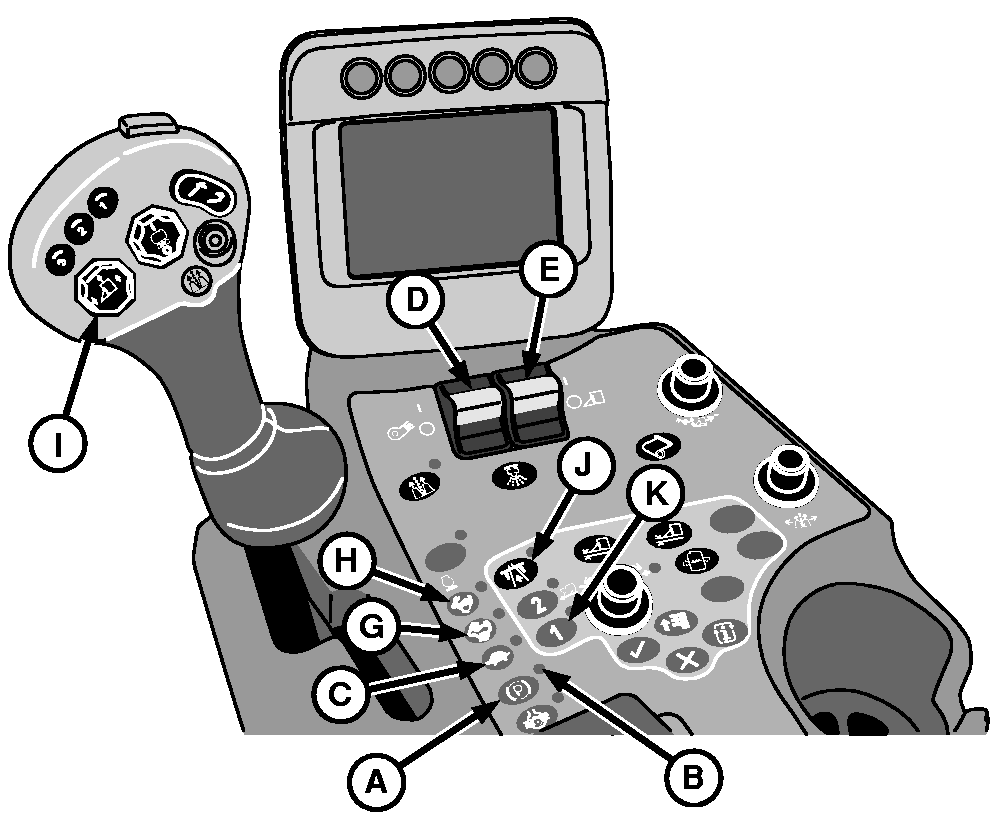
A - Park Brake Button
B - Park Brake Indicator
C - Low Engine Speed Button
D - Fan Switch
E - Row Units Switch
F - Auto Mode Indicator
G - Medium Engine Speed Button
H - High Engine Speed Button
I - Row Units Raise/Lower Button
J - Road/Field Mode Button
K - Transmission Mode 1 Button
Move machine into field. Position machine with row units centered on crop rows. -
Move multifunction control handle to neutral.
-
Press park brake button (A) to engage park brake in manual mode. Verify that park brake indicator (B) comes on steady (not flashing).
-
NOTE: Engine must be operating at slow idle for fans to start.
Press low engine speed button (C).
-
Move fan switch (D) forward to ON position.
-
Move row units switch (E) to ON position. Auto mode indicator (F) on round module builder status display begins flashing.
-
IMPORTANT: Row unit input slip clutches can slip during cold temperature start-up. To avoid damage to clutch jaws during initial start-up, allow sufficient warmup time with units engaged at slow engine throttle. Gradually increase engine speed until units can be run at high engine speed without clutch slippage.
NOTE: If machine is not moving, park brake must be engaged in manual mode for row units to operate.
With park brake engaged in manual mode, slowly advance multifunction control handle to start units.
-
After a few minutes, press medium engine speed button (G).
-
After a few more minutes, press high engine speed button (H).
-
Check solution system pressure and adjust as necessary. (See ADJUSTING SOLUTION SYSTEM PRESSURE in Moistener System section.)
-
Press down arrow on row units raise/lower button (I) to lower all row units. Lowering units also engages header height control system. The header height control system automatically maintains a preset unit-to-ground clearance. (See OPERATE AND ADJUST HEADER HEIGHT CONTROL in Header Height Control section for more information.)
-
Press road/field mode button (J) to engage field mode and verify that indicator light beside button is OFF.
-
Press transmission mode 1 button (K) and verify that indicator light beside button comes ON.
-
Press park brake button and verify that indicator light flashes.
-
Push multifunction control handle forward and begin harvesting.
-
IMPORTANT: Damage to row units can occur from rocks, roots, wire, and other obstacles in field. Raise row units as necessary to clear irrigation ditches and other obstacles.
Press left-hand arrow or right-hand arrow on row units raise/lower button to raise units on respective frame as necessary to avoid obstacles. Press and release down arrow on button to return units to previous height after clearing obstacles.
-
NOTE: Auto mode must be engaged before accumulator gets full.
N96711-UN-27JAN12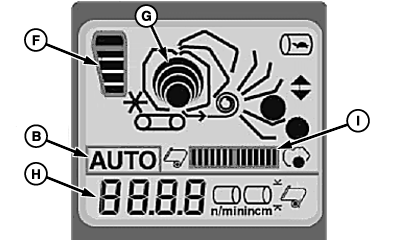
N96712-UN-27JAN12Round Module Builder Status Display
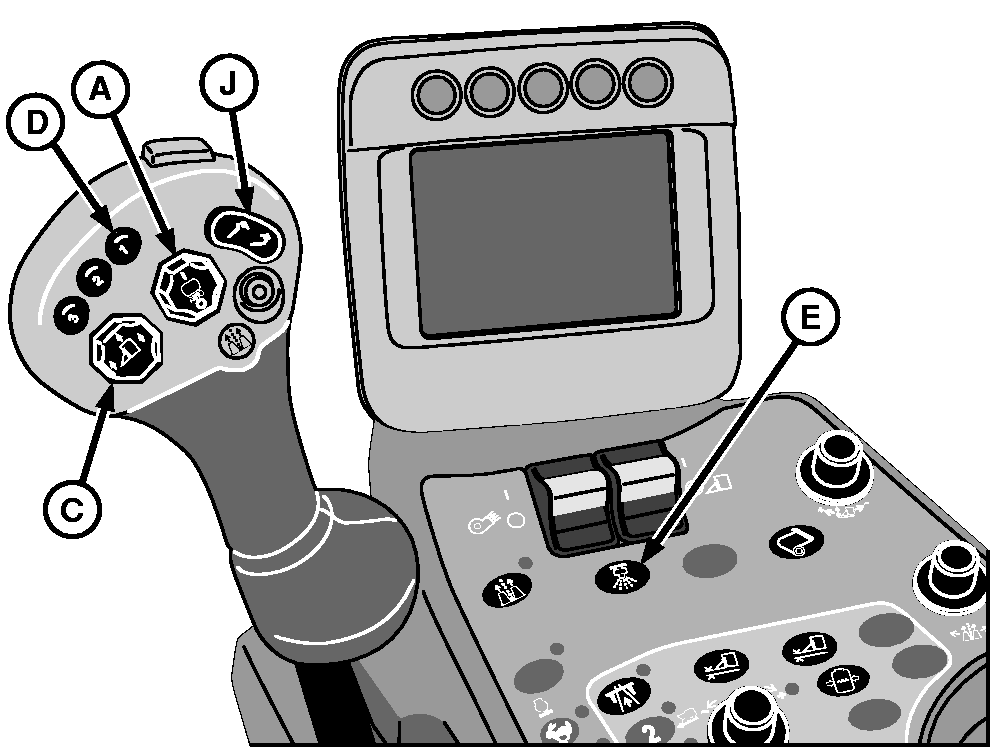
A - Auto Mode Engage Button
B - Auto Mode Indicator
C - Row Units Raise/Lower Button
D - Moistener Flush Button 1
E - Moistener Flush Button
F - Accumulator Fill Level Icon
G - Module Status Indicator
H - Current Module Size
I - Wrap Progress Indicator
J - Handler Raise/Lower Switch
Press and release top of auto mode engage button (A) to engage auto mode. Auto mode indicator (B) on round module builder status display stops flashing and remains on. -
When machine reaches the end of the field:
-
Press top of row units raise/lower button (C) to raise all row units while turning machine.
-
Press and release moistener flush button (D) on control handle or button (E) on console to actuate flush system. Under normal conditions, the flush system is used at one end of the field only.
-
Press bottom of row units raise/lower button to lower all row units as machine re-enters the rows.
-
-
As picking continues, accumulator fill level icon (F) shows the approximate amount of cotton in the accumulator.
-
In the AUTO mode, when the accumulator is full, the feeder system starts moving cotton to the module builder. Module status indicator (G) shows the relative size of the module being built.
-
The current size of the module in the chamber (H) is shown on the module builder status display. When module size reaches a preset diameter, the machine initiates the wrap sequence.
-
Progress of wrap sequence is shown on progress indicator (I).
-
When operating in temperatures below 25 °F (-3.9 °C), separation of tacky and non-tacky sections of wrap material can occur. If separation occurs:
-
Press and release auto mode button after first bar appears on wrap progress indicator.
-
Immediately press and release auto mode button again. Module builder belt speed slows to 60 rpm.
-
-
NOTE: A notice appears every time a wrap sequence has completed and a module is ready to be ejected.
Module must be ejected before next module forming sequence can begin.
To eject module to handler:
- While moving—press and release auto mode engage button (A).
- While stationary—press and hold auto mode engage button.
-
To drop module:
- While moving—press bottom of handler raise/lower switch (J) to the second detent.
- While stationary—press and hold bottom of handler raise/lower switch until module has dropped. Drive machine forward to ensure that handler is clear of module and can be raised.
-
After module is dropped, press top of handler raise/lower switch
to return handler to harvest position.
-
NOTE: Advance notice is given so operator can replace wrap when convenient.
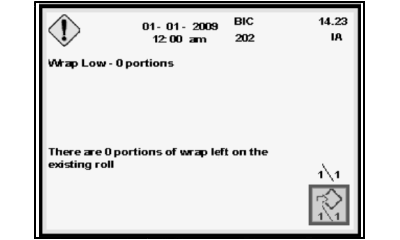
N88491-UN-26APR10Low Wrap Warning Message
When wrap remaining on current roll becomes low, a message appears on the display unit. When no portions remain, remove empty wrap roll and replace with a full roll. (See REMOVING AND REPLACING EMPTY WRAP ROLLS in Round Module Builder section.)
|
DP99999,000079B-19-20120227 |