Daily Service Mode Screens
N87838-UN-26FEB10
N87839-UN-02MAR10
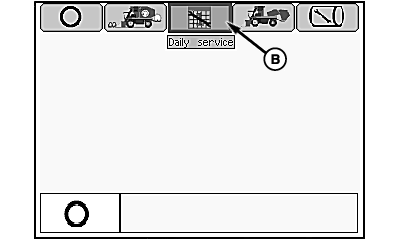
Mode Management Screen
N87840-UN-02MAR10
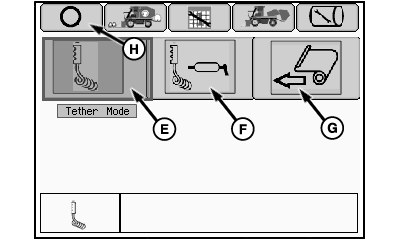
Tether Mode Selection Screen
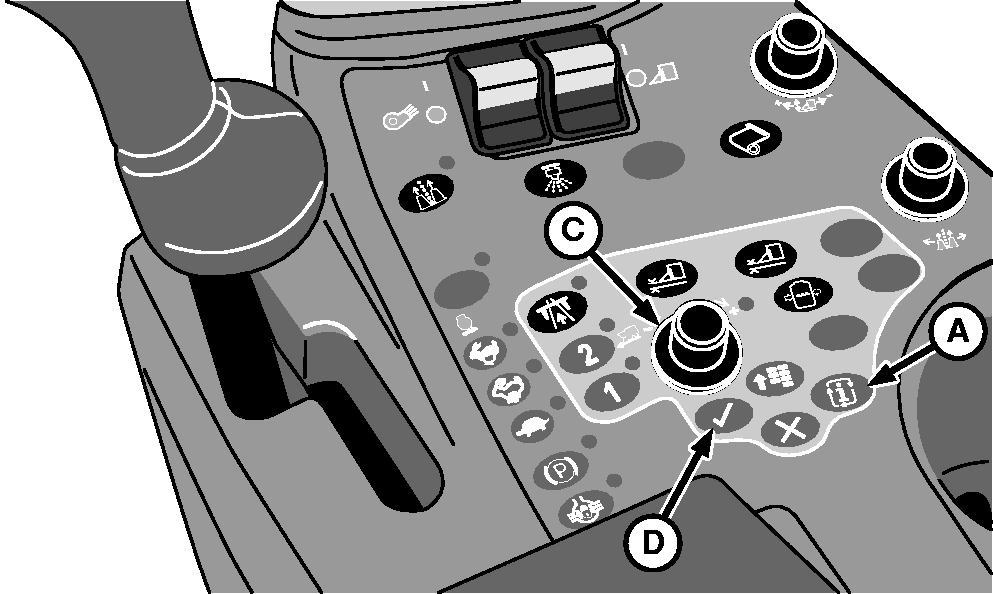
A - Mode Select Button
B - Daily Service Icon
C - Selection Dial
D - Confirm Button
E - Tether Mode Icon
F - Lube and Tether Mode Icon
G - Load Wrap Mode Icon
H - OFF Icon
The service mode screens are used for the following purposes:
- to engage row units in tether mode when inspection of row unit operation at slow speed is required
- to engage machine and row units in lube and tether mode for daily lubrication of the row units using the onboard lubrication system
- to engage machine in load wrap mode to replenish the machine with rolls of wrap used to cover the round modules
-
Press mode select button (A) on control console. Mode management screen appears on the armrest display unit (ADU).
-
Highlight daily service icon (B) using selection dial (C).
-
Press confirm button (D). Tether mode selection menu appears on ADU.
-
Highlight tether mode icon (E) and press confirm button to enter tether mode for row unit inspection.
-
Highlight lube and tether mode icon (F) and press confirm button for daily lubrication of row units using onboard lubrication system. (See OPERATING ONBOARD LUBE SYSTEM in Onboard Lubrication System section for further information on this mode.)
-
Highlight load wrap mode icon (G) and press confirm button when necessary to load new rolls of wrap material on the machine. (See LOADING MODULE BUILDER WRAP in Round Module Builder section for further information.)
-
Highlight OFF icon (H) and press confirm button to leave service mode.
|
DP99999,00007A1-19-20110711 |