Using Moistener Flush System
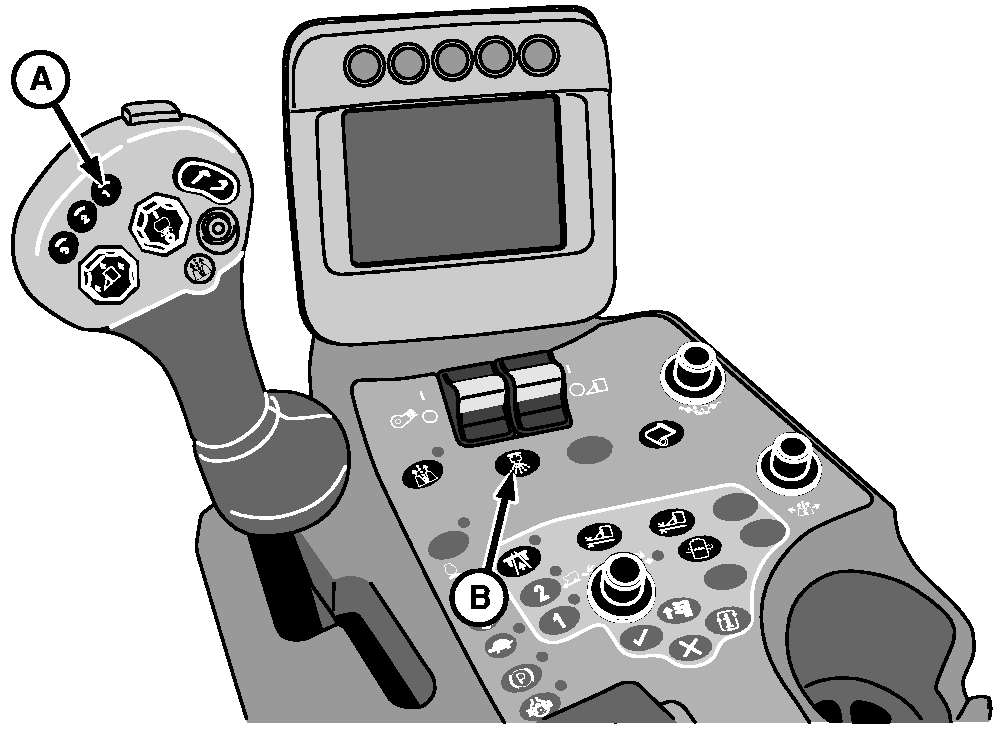
N88276-UN-26MAR10
A - Moistener Flush Button 1
B - Moistener Flush Button 2
Actuate moistener flush system as required to direct a higher flow of spindle cleaner solution to the moistener pads to assist in removing spindle buildup. Field conditions such as green sappy plants require more frequent flushing. (See REACTING TO SPINDLE BUILDUP in this section.)
NOTE: Two flush buttons are provided. Either button can be used to actuate flush system.
Flush system operates for 4—5 seconds each time button is pressed and released.
When spindle buildup is observed, actuate flush system by pressing and releasing moistener flush button 1 (A) on multifunction control handle or flush button 2 (B) on control console.
To ensure lowest solution usage, operate flush system as follows, based on spindle buildup conditions observed:
- Normal or tough staining conditions: At one end of field.
- Extreme staining conditions: At both ends of field.
When flushing at end of field, press and release flush button as row units are just starting to raise and turning begins. This sequence allows excess solution to be removed before re-entering the row.
DO NOT operate flush system in row while picking. Excess solution can cause plugging.
|
DP99999,00007A5-19-20110713 |