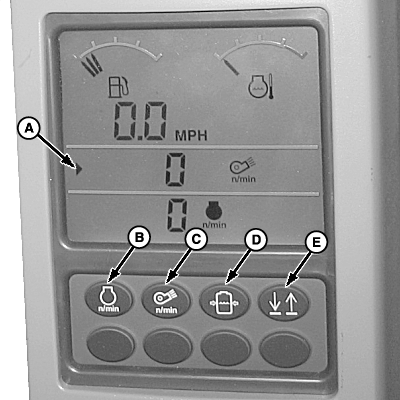
Tachometer Display
N80725-UN-13MAY08
A - Line Select Arrow
B - Engine Speed Switch
C - Fan Speed Switch
D - Solution Pressure Switch
E - Line Select Switch
Two lines of data can be displayed on the tachometer at the same time. Engine speed, fan speed, or solution pressure can be displayed on either line.
NOTE: The top line currently displays fan speed and the bottom line engine speed.
Line select arrow (A) points to the line currently selected for change. Press line select switch (E) to change the selection from one line to the other.
To display a different data item on the selected line, press the corresponding switch, as follows:
- Press switch (B) to display engine speed.
- Press switch (C) to display fan speed.
- Press switch (D) to display solution pressure.
Fuel level and engine coolant temperature are always displayed at the top of the display.
|
DP99999,00007C7-19-20111206 |