Unloading Cotton at End of Field
This procedure is used to unload the accumulator, wrap, and eject a partial module at the end of the field or at the end of the harvest day.
-
NOTE:
N80890-UN-23MAY08
N95803-UN-27JAN12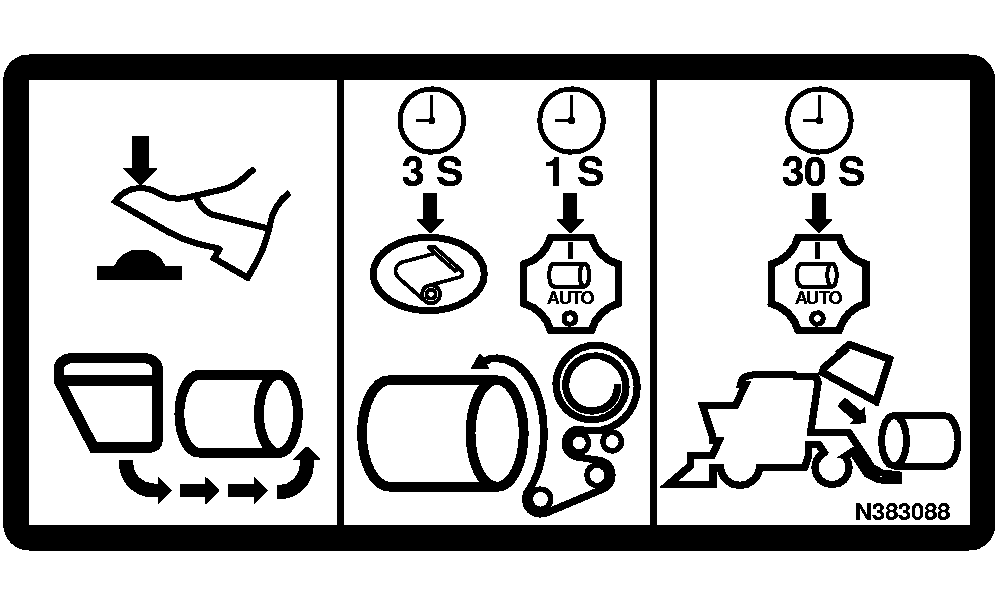
N97111-UN-21FEB12A - Accumulator Empty Switch
B - Wrap Request Button
C - Auto Mode Button
Engine must be running at full speed to assure that all components are feeding at appropriate speeds to form, wrap, and eject module properly.Stop machine, engage parking brake, and raise picking units. Run picking units for 20—30 seconds to clean off excess cotton.
-
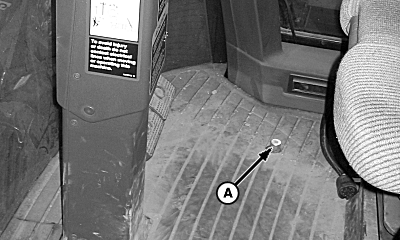
Press and hold accumulator empty switch (A) on floor of cab to empty accumulator. Audible alarm sounds and message appears on armrest display unit when accumulator is empty.
-
Press and hold wrap request button (B) for 3 seconds until wrap process icon on round module builder monitor display comes on.
-
Press and hold auto mode engage button (C) until wrap sequence is complete. Release auto mode engage button.
-
Press auto mode engage button (C) again and hold until eject sequence is complete. Eject cycle is complete when gate icon stops flashing.
Unloading Instructions
1. Empty
Press and hold floor switch.
2. Wrap
Press and hold “Wrap Request” button on armrest control console for 3 seconds.
Press and hold “Auto Mode Engage” button on multifunction control handle until wrap cycle is complete.
3. Eject
Release then press and hold “Auto Mode Engage” button until eject cycle is complete.
|
DP99999,00007D4-19-20120221 |