Header Height Control Operation and Adjustment
IMPORTANT: Before operating or adjusting system, verify that row unit tilt is correct. Incorrect tilt can result in damage to units or machine. (See ADJUSTING ROW UNIT TILT in Row Units section.)
-
NOTE: Fan and units switches must be ON for system to operate. Verify that switches are ON before checking system for proper operation.
N95670-UN-27OCT11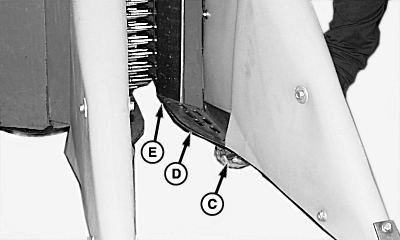
N58976-UN-12DEC01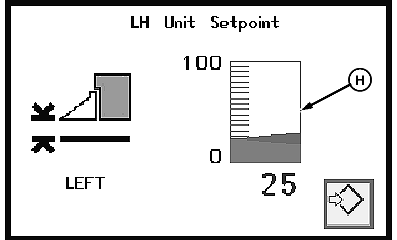
N79919-UN-06FEB08Header Height Setpoint Display
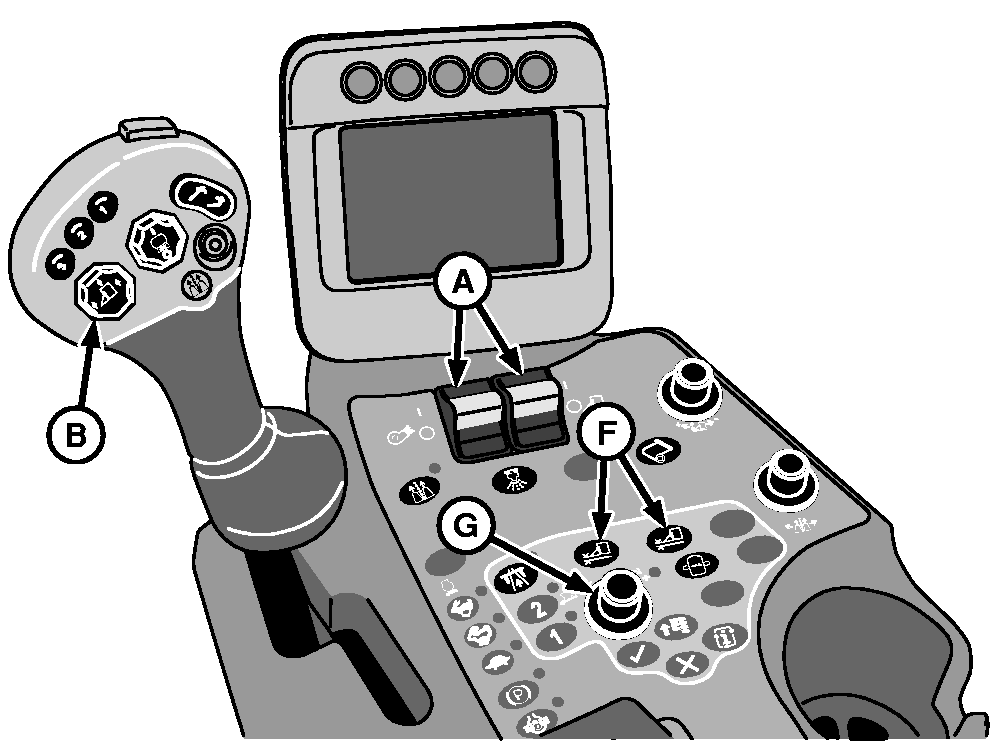
A - Fan and Units Switches
B - Row Units Raise/Lower Button
C - Height Sensing Shoes
D - Plant Guides
E - Wear Plate
F - Row Units Height Adjust Buttons
G - Selection Dial
H - Header Height Setpoint Display
Position machine on the cotton rows. Drive and guide wheels must be in the field, on the rows, and at the same level. Place multifunction control handle in neutral and move fan and units switches (A) fully forward to ON position. -
With engine operating at mid throttle and hydraulic system warmed up, press bottom of row units raise/lower button (B) to lower all units to preset height.
-
 CAUTION: If you or others become entangled in a unit, serious
injury or death can result. Make sure that multifunction control handle
remains in neutral position and stand clear of units during testing.
Keep away from areas which can pinch or crush as units move up and
down.
CAUTION: If you or others become entangled in a unit, serious
injury or death can result. Make sure that multifunction control handle
remains in neutral position and stand clear of units during testing.
Keep away from areas which can pinch or crush as units move up and
down.Have an assistant lift one of the unit height sensing shoes (C) until units are fully raised, then release shoe. Verify that units return to previous height.
-
NOTE: Set header height so units are positioned no lower than necessary to pick cotton. For low hanging bolls or lodged and tangled limbs, position plant guides (D) or wear plate (E) so they just touch the top of the beds (just skim the surface, not plow).
To adjust header height: Press left- or right-hand height adjust buttons (F) and rotate selection dial (G) clockwise to raise operating height of corresponding row units or counterclockwise to lower operating height. Observe setpoint (H) on armrest display unit.
-
Recheck unit tilt adjustment. (See ADJUSTING ROW UNIT TILT in Row Units section.)
-
Set response rate. (See HEADER HEIGHT CONTROL RESPONSE RATE ADJUSTMENT in this section.)
|
DP99999,00007DD-19-20111220 |