Filling Moistener System Tank
 CAUTION:

TS227-UN-23AUG88
N96260-UN-21DEC11
N96259-UN-21DEC11
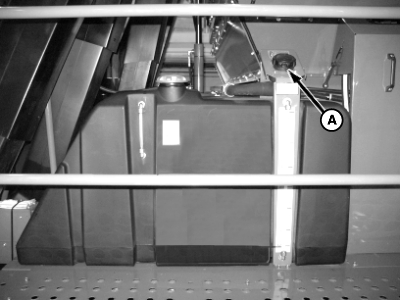
A - Tank Fill Port
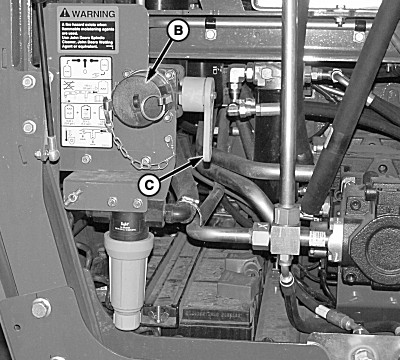
B - Remote Fill Port
C - Fill Valve Handle
Flammable petroleum wetting agents can accidentally ignite and cause serious injury or death to you or others. Do not use a flammable petroleum wetting agent.Spindle cleaner can cause serious injury or death if ingested. Spindle cleaner can cause eye irritation. Keep spindle cleaner out of reach of children. Wash hands after handling spindle cleaner. Induce vomiting if swallowed. Flush eyes with water if cleaner contacts eyes. In either case, contact a physician immediately.
IMPORTANT: Water MUST be clean and free of trash. Contaminated water will cause moistener system to malfunction.
Water and cleaner WILL NOT mix if cleaner is poured into empty tank before water is added. Water MUST be added first.
Use of some wetting agents can lower cotton grade.
The moistener system tank can be filled by mixing solution directly in the tank or by filling with premixed solution from a bulk tank. In either case, the tank can be filled through tank fill port (A), located on the left side platform, or through remote fill port (B) located in the hydraulic module.
Mixing Solution in Moistener Tank
-
IMPORTANT: Be sure to check sight gauge on solution tank to determine amount of solution required to fill tank.
DO NOT operate pump when tank is empty. Damage to pump can occur.
NOTE: Water and spindle cleaner can be added to moistener tank at any time. If tank is empty, add water to tank before adding cleaner.
Moistener tank capacity is 1363 L (360 gal.).
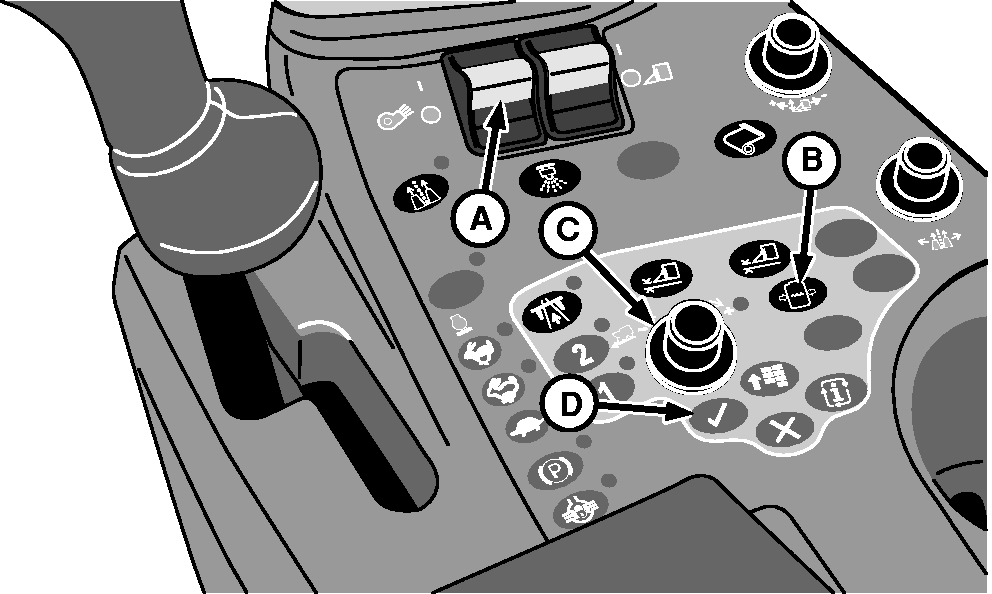
N88318-UN-07APR10A - Fan Switch
B - Solution Pressure Adjust Button
C - Selection Dial
D - Confirm Button
Determine approximate amount of solution required to fill moistener tank. Sight gauge on tank indicates approximate amount of solution remaining in tank. -
If filling tank through remote fill port, move fill valve handle to OFF position.
-
Connect water supply hose to tank fill port or remote fill port.
-
If using remote fill port, turn fill valve handle to FILL TANK position.
-
Fill moistener tank approximately half full of water.
-
Start engine and turn fan switch (A) ON to agitate water.
-
Press solution pressure adjust button (B) to display solution pressure setting.
-
Rotate selection dial (C) to obtain highest pressure.
-
Press confirm button (D) to enter new setting.
-
While water is agitating, slowly add correct amount of John Deere Spindle Cleaner or Wetting Agent. (See USING JOHN DEERE SPINDLE CLEANER in this section, or see product label for proper mixing ratios.)
-
Finish filling tank with water.
-
Continue agitation for approximately 5 minutes.
-
Adjust solution pressure to normal operating pressure. (See ADJUSTING SOLUTION PRESSURE in this section.)
-
Shut off engine.
-
If using remote fill port, turn fill valve handle to OFF position.
-
Disconnect water supply hose from fill port.
-
Install cover on fill port. Turn fill valve handle to ON position.
Filling Moistener Tank with Premixed Solution
-
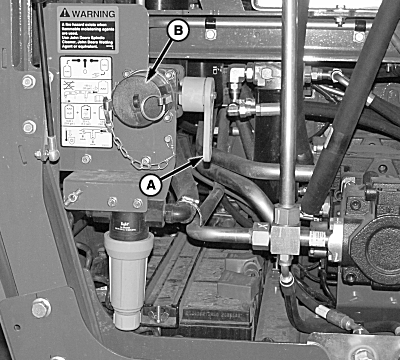
N96261-UN-21DEC11A - Fill Valve Handle
B - Remote Fill Port
If solution is premixed in bulk tank, agitate solution for several minutes before filling moistener tank. -
Turn fill valve handle (A) to OFF.
-
Connect hose from bulk tank to remote fill port (B).
-
Turn fill valve handle to FILL TANK position.
-
Open valve on bulk tank and fill moistener tank.
-
Close valve on bulk tank. Turn fill valve handle to OFF.
-
Disconnect hose from remote fill port.
-
Install cover on fill port. Turn fill valve handle to ON position.
|
DP99999,00007E0-19-20111221 |