Replacing Rotary Screen Drive Belts
Outer Drive Belt
-
 CAUTION: Sudden movement of rotary screen and drive belt can
cause serious injury or death to you or others. Shut off engine and
remove key before replacing rotary screen drive belt.
CAUTION: Sudden movement of rotary screen and drive belt can
cause serious injury or death to you or others. Shut off engine and
remove key before replacing rotary screen drive belt.
TS285-UN-23AUG88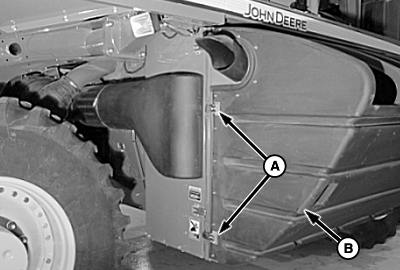
N96504-UN-13FEB12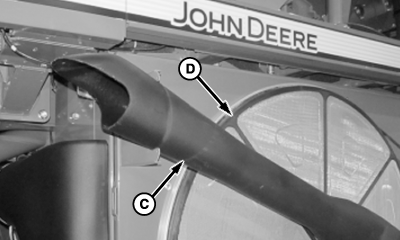
N96512-UN-13FEB12A - Latch
B - Door
C - Trash Expeller
D - Rotary Screen
Unhook latches (A) and open door (B). -
Pull trash expeller (C) away from rotary screen (D).
-
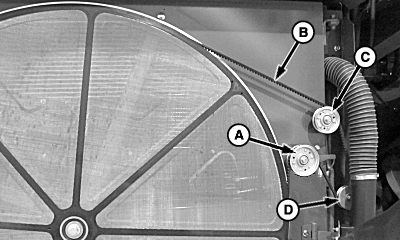
N96513-UN-13FEB12A - Spring Loaded Idler Pulley
B - Belt
C - Idler Pulley
D - Drive Sheave
Pull down on spring loaded idler pulley (A) and remove belt (B) from idler pulley (C) and drive sheave (D). -
Install replacement belt in reverse order. (See ROTARY SCREEN BELT ROUTING in this section.)
Inner Drive Belt
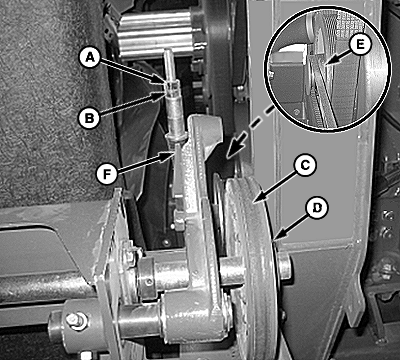
N87514-UN-14DEC09
A - Jam Nut
B - Adjusting Nut
C - Drive Belt
D - Rotary Screen Drive Sheave
E - Engine Drive Sheave
F - Tension Indicator
-
Loosen jam nut (A) and adjusting nut (B) on drive belt tensioner.
-
Remove drive belt (C) from rotary screen drive sheave (D) and engine drive sheave (E).
-
Install new belt on drive sheaves and under tensioner sheave.
-
Tighten adjusting nut until end of tension indicator (F) is within thickness of washer on tension rod.
-
Tighten jam nut.
|
DP99999,0000837-19-20120213 |