Engine Information Screens
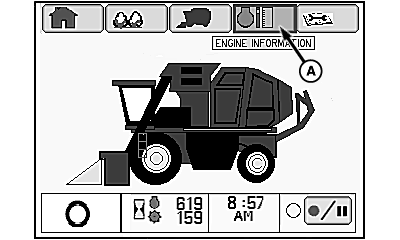
N93039-UN-17JUN11
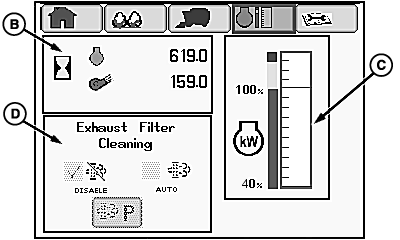
N93040-UN-11JUL11
Engine Information Screen 1
A - Engine Information Tab
B - Engine and Fan Hours
C - Engine Power Meter
D - Exhaust Filter Cleaning Options
The following information is shown on the engine information screen:
- Engine and fan hours (B)
- Engine power meter (C)
- Exhaust filter cleaning options (D)
Open engine information screen 1 as follows:
-
Highlight engine information tab (A) on home screen.
-
Press confirm button. Engine information screen 1 appears on display unit.
Engine and Fan Hours
The cumulative operating hours for the engine and the cotton fans is displayed.
Engine Power Meter
This display shows the current operating power level of the engine in bar graph form. Operate machine at power levels in the green region of the graph to maximize engine and machine performance.
IMPORTANT: If indicator bar moves into the red region, engine power is maximized and the machine can potentially stall. To avoid engine stall, slow machine until indicator moves back into the yellow or green region of the graph.
Exhaust Filter Cleaning Options
This machine is not equipped with an exhaust filter cleaning system. The cleaning option icons on the display are not active.
|
DP99999,000083C-19-20120215 |