Armrest Display Unit (ADU) Navigation
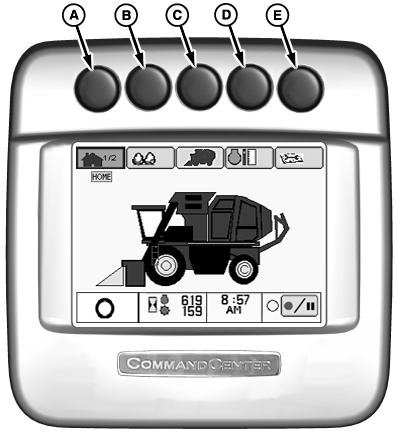
N92985-UN-16JUN11
Armrest Display Unit
The armrest display unit (ADU) together with the armrest control console provides the primary interface between the operator and the machine. Basic operating information is classified into various categories and is available by pressing shortcut buttons (A—E) at the top of the display unit. This information can also be accessed using the operator interface controls on the armrest control console. More specific information such as display settings (time, backlighting, language, units of measure), control unit settings, and diagnostic trouble code information is available only by using the console controls.Press shortcut button to select the desired category of information to view. The corresponding icon on the display screen is highlighted and the number of available main pages within that selection is shown. Press shortcut button again to advance through main pages. Further navigation is performed using the controls on the armrest console. (See OPERATOR INTERFACE CONTROLS in this section.)
At start-up, the ADU displays current active trouble code messages. Each message must be acknowledged using the confirm button on the control console before access to any other information screens is available.
|
Display Navigation |
||
|---|---|---|
|
Button |
Screen Name |
Screen Function |
|
A |
Home Screen |
Page 1: Displays index tabs at top of screen to access the following:
Displays operating mode, engine and fan operating hours, and time of day at bottom of screen. Page 2: Displays additional operating parameter values. |
|
B |
Harvest Information Screen |
Displays harvest yield data, harvest rate data, and fuel consumption data. |
|
C |
Machine Configuration Screen |
Page 1: Displays wrap portions, module size, and compactor mode. Operator can reset values. Page 2: Displays row unit configuration data. Operator can reset if configuration is changed. |
|
D |
Engine Information Screen |
Displays engine operating hours, fan operating hours, and engine power level bar graph. |
|
E |
Diagnostics Readings and Calibration Screen |
Page 1: Provides list of active trouble codes. Page 2: Provides access to diagnostic readings screens for various machine subsystems. Page 3: Provides access to calibration procedures. |
|
DP99999,000084D-19-20120227 |