Operate Boom Air Purge—If Equipped
-
N102410-UN-20FEB13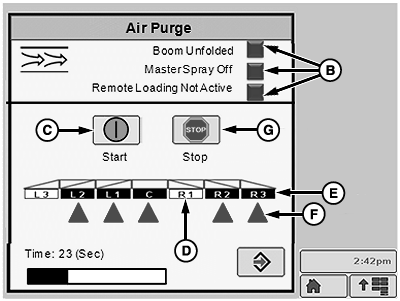
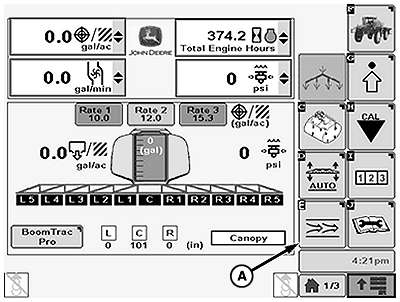
N102411-UN-20FEB13A - Boom Air Purge Softkey
B - Indicators
C - Start Button
D - Disabled Spray Section
E - Enabled Spray Section
F - Cone
G - Stop Button
Press Boom Air Purge softkey (A). -
The following conditions must be met before Boom Air Purge can be used:
- Inner boom sections unfolded
- Master spray must be off for minimum of 2 seconds
- Remote load stations must be inactive
Indicators (B) will be green when all conditions are met.
-
Press Start button (C) to begin boom air purge.
-
Only enabled boom sections will be purged.
NOTE: Disabled sections (D) are shown as a white background and dark lettering. Enabled sections (E) will be indicated by a dark background and light lettering. A cone (F) will be displayed below active sections during purge process.
-
Boom sections can be enabled using the boom section switches on CommandARM side console or by using the IBS function on the multifunction control handle. Fence row nozzles can also be enabled using right-hand and left-hand fence row nozzle switches on CommandARM.
-
NOTE: Purge cycle is 2 minutes, purging will end automatically when time has elapsed.
Purging can be stopped by pressing Stop button (G) or the master spray ON switch on multi function control handle.
-
Repeat procedure if further purging is desired.
|
CS12167,0000320-19-20130613 |