Transport Machine
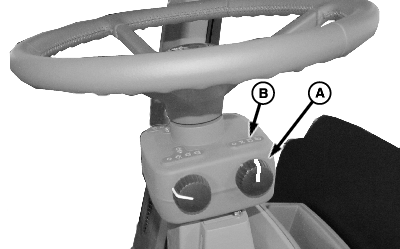
N98761-UN-17SEP12
A - Light Switch
B - Transport Position
 CAUTION: DO NOT exceed maximum transport speed of machine or
you may lose control of machine, causing serious injury or death to
you or others.
CAUTION: DO NOT exceed maximum transport speed of machine or
you may lose control of machine, causing serious injury or death to
you or others.
Transport machine at narrowest tread adjust setting only.
-
Be sure S.M.V emblem is installed on boom (or rear of machine).
-
Start engine (See Starting the Engine in this section).
-
Turn light switch (A) to transport position (B) (as necessary). Check that amber warning lights are flashing and that all lights are clean and visible.
-
Adjust tread width to narrowest position. (See Setting Tread Width in Chassis section.)
-
IMPORTANT: Machine may be damaged if transported with booms not completely lowered onto boom supports.
Boom Return to Height will remain active after boom is folded. When lowering boom onto supports, boom may stop at set point if it is above support rest height. Boom can be lowered beyond set point by pressing Boom Lower switch again.
Fold booms. (See Folding Boom in Booms section.)
-
If nozzles are dripping, relieve boom pressure. (See Relieving Boom Pressure in this section.)
-
Push transport lock switch to put machine in transport mode.
-
Push high idle switch to achieve maximum engine speed.
-
Select appropriate target speed range. When machine is started, Low Range is automatically selected by the Chassis Control Unit.
IMPORTANT: Do not exceed tire weight load ratings printed on side wall of tires. Verify maximum transport weight from side wall of tire before loading and do not exceed that weight.
Refer to Wheels and Tires section of this manual for proper tire inflation recommendations for your machine configuration. See Safety Signs section in this manual for guidelines on transporting machine.
-
CAUTION: DO NOT exceed your local or national maximum transport
speed limit or you may lose control of machine, causing serious injury
or death to you or others. Know your local or national maximum transport
speed limit before transporting the machine. See Speed Limit Decal
in the Specification section.
Push multifunction control handle slowly forward to start forward travel. Continue pushing handle forward to increase ground speed. When engine reaches maximum R.P.M., push top of target speed switch to advance to higher speed range, if desired.
CAUTION: When transporting machine downhill at transport speeds,
machine will try to hold the target speed until engine begins to over
speed. At this time the vehicle speed could increase beyond target
speed. Before starting down a hill, select a speed range that is appropriate
for the load on the machine and the steepness and length of the slope. -
To reverse direction of travel, move multifunction control handle (MFCH) to neutral and press brake pedal as required to bring machine to a complete stop, then move handle to the right and rear to back up machine. Reverse speed available is proportional to the distance MFCH is moved.
|
CS12167,0000449-19-20130919 |