Operate Rinse System
-
 CAUTION: Spray system can contain hazardous material which can
cause serious injury or death to you or others. Wear protective clothing,
eyewear, and gloves. Use rinse system in a area where people, animals,
vegetation, and water supply etc. cannot be contaminated.
CAUTION: Spray system can contain hazardous material which can
cause serious injury or death to you or others. Wear protective clothing,
eyewear, and gloves. Use rinse system in a area where people, animals,
vegetation, and water supply etc. cannot be contaminated.NOTE: To rinse entire system, solution tank must be empty.
N94530-UN-21SEP11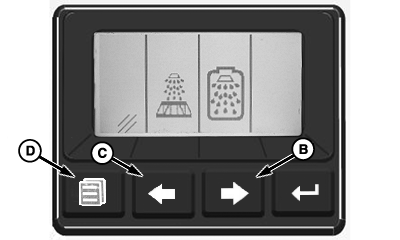
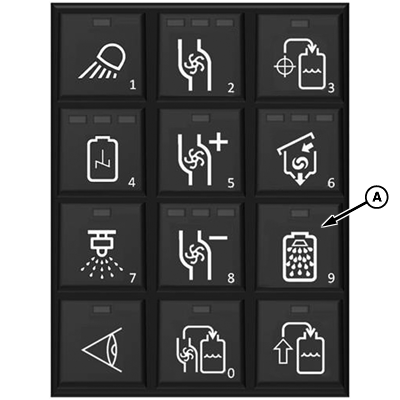
N103401-UN-24APR13A - Rinse Button
B - System Rinse Button
C - Boom Rinse Button
D - Cancel Button
Press rinse button (A). -
Press system rinse button (B) or boom rinse button (C) to select desired rinse procedure. Press cancel button (D) to cancel rinse procedure.
-
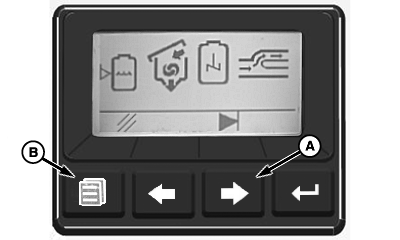
N103402-UN-24APR13A - Advance Button
B - Cancel Button
System rinse selected:-
Rinse procedure begins automatically and rinses the following systems:
- Eductor
- Agitation
- Bypass
- Solution Tank
- Boom
NOTE: When rinsing eductor operator must manually open eductor rinse and sump valves when display shows that portion of rinse cycle.
-
Press advance button (A) to skip to next step if desired.
-
Press rinse button or cancel button (B) to stop automatic rinse.
-
After rinse procedure is complete, spray rinse solution in a safe location where contamination can not occur.
-
-
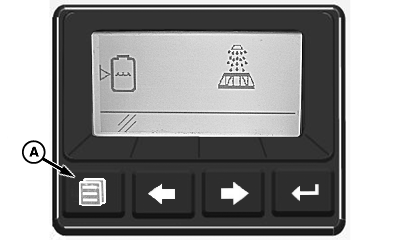
N103403-UN-24APR13A - Cancel Button
Boom rinse selected:-
Rinse procedure begins automatically and rinses the following:
- Boom Plumbing
- Flowmeters
- Pressure Strainers
-
Press cancel button (A) to stop rinse procedure.
NOTE: System rinse and boom rinse procedures can be operated from the cab using the GS3 display. (See Setup System Rinse or Rinsing Boom in SprayStar section of this manual.)
-
|
KB78086,0000B30-19-20130515 |