Turn Sections Off Alarm On/Off
N101900-UN-08MAY13
N74753-UN-17JAN07
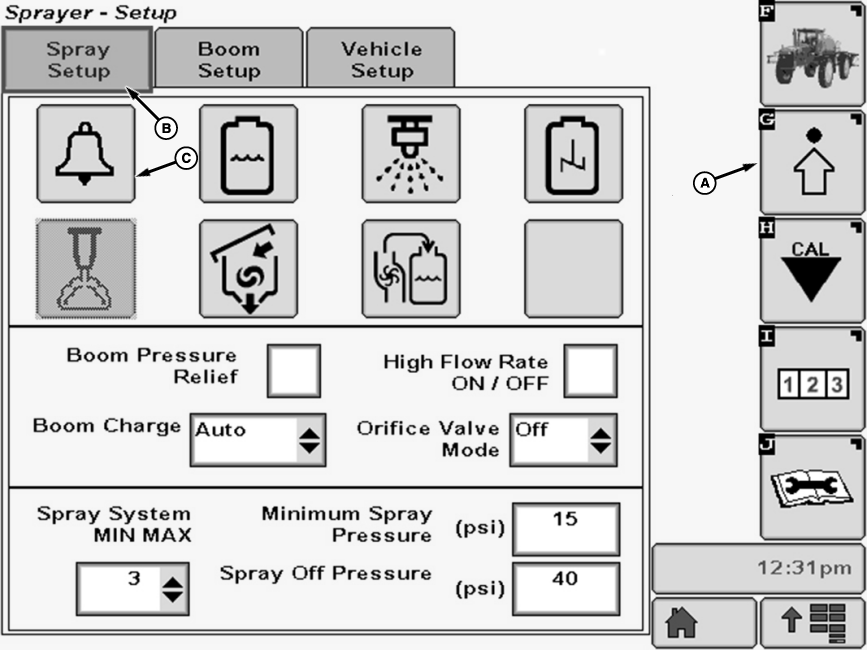
A - Setup Softkey
B - Spray Setup Tab
C - Alarm Setup Button
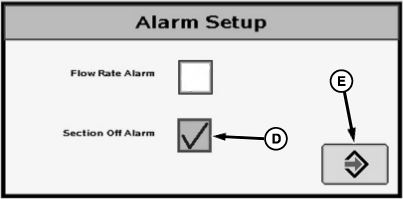
D - Check Box
E - Enter Button
The Sections Off alarm occurs when one or more of the spray sections are disabled by the section switches when Master Spray ON/OFF switch on multifunction control handle is activated.To turn the alarm ON or OFF:
-
Select the Setup softkey (A) to view the setup menu.
-
Select the Spray Setup tab (B).
-
Press Alarm Setup button (C). The Alarm Setup screen will appear.
-
NOTE: A check mark in the box indicates that Section Off Alarm is activated.
Select check box (D) next to Section Off Alarm and a check will appear inside box activating item. To deactivate a check box, touch check box to remove the check.
-
Select the enter button (E) to return to Spray Setup screen.
|
OUO6092,0000800-19-20130613 |