Spray Nozzle Calculator
-
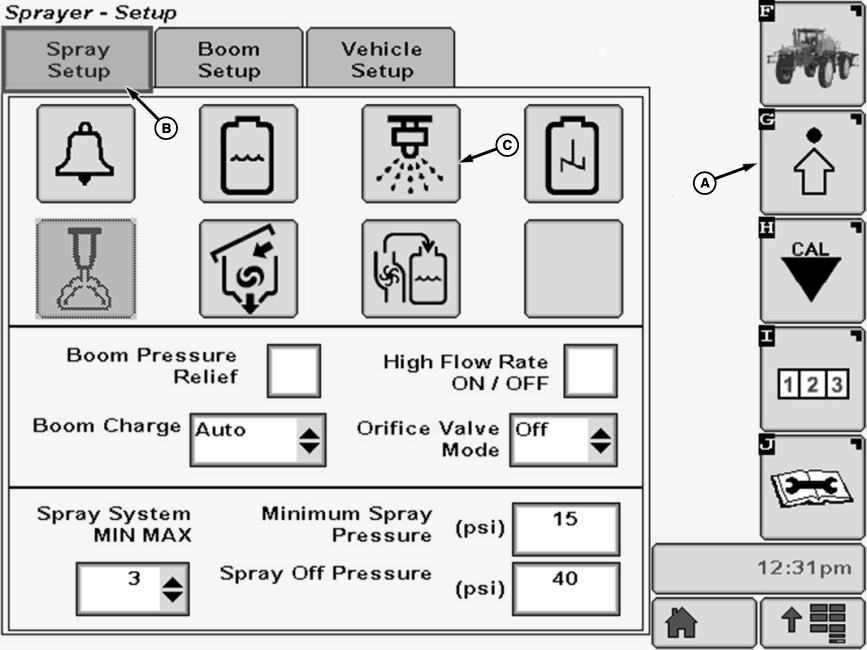
N101902-UN-08MAY13A - Setup Softkey
B - Spray Setup Tab
C - Spray Tip Calculator Button
Select the Setup softkey (A) to view the setup menu. -
Select the Spray Setup tab (B).
-
Select Spray Tip Calculator Button (C) to access spray tip calculator to determine proper tip size for desired application.
-
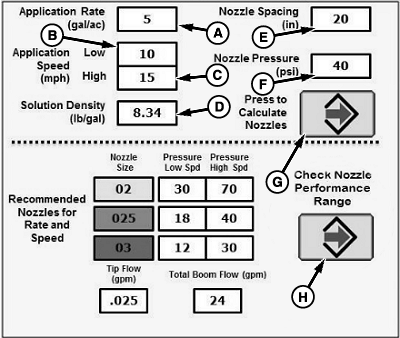
N103728-UN-09MAY13A - Input Box
B - Input Box
C - Input Box
D - Input Box
E - Input Box
F - Input Box
G - Enter Button
H - Enter Button
Select input boxes (A - F) and input required data using pop-up keypad. -
Press Enter button (G) to calculate nozzle recommendations.
-
Press Enter button (H) to Check Nozzle Performance Range.
-
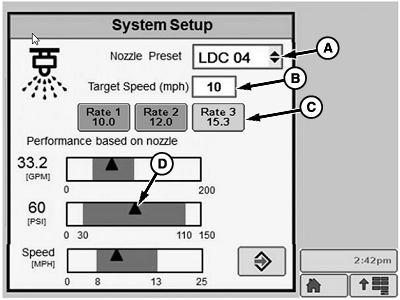
N103729-UN-09MAY13A - Drop-Down Menu
B - Input Box
C - Application Rate
D - Indicator
Select desired nozzle type and size from drop-down menu (A). -
Set target application speed using input box (B) and pop-up keypad.
-
Select target application rate (C) from preset rates.
-
If indicator (D) is in shaded area, then nozzle performance is satisfactory.
|
OUO6092,0000802-19-20130613 |