Preparing Hydraulic System—John Deere 8000/9000, 8020/9020, and 8030/9030 Series Tractors
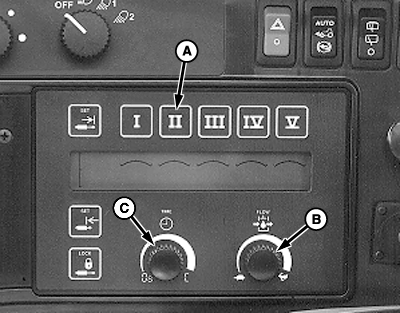
N88249-UN-06MAY10
8000/8020 and 9000/9020 Display
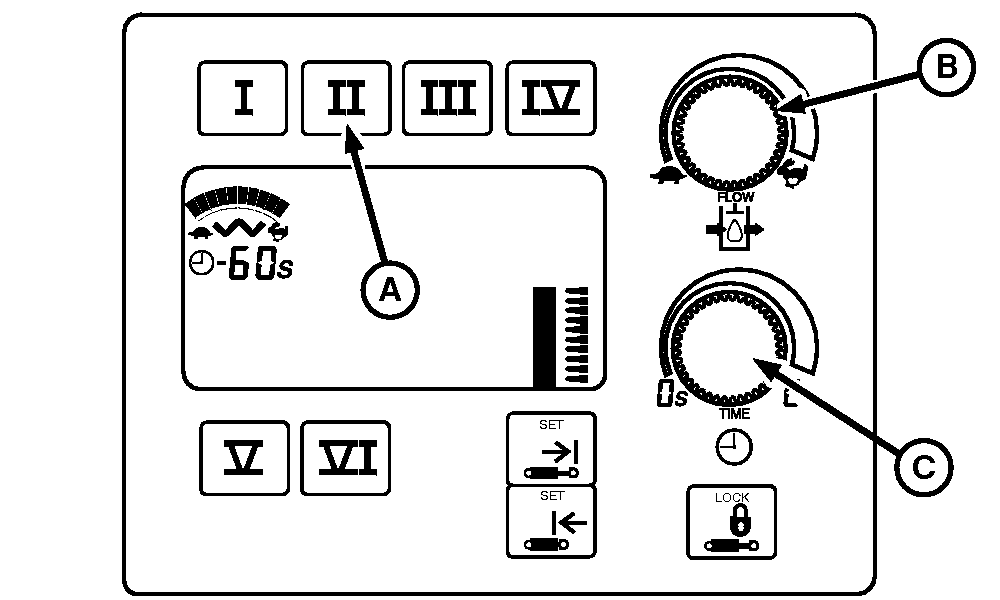
N88248-UN-06MAY10
8030/9030 Display
A - SCV II Selector Button
B - Flow Control Knob
C - Time Detent Knob
-
Check hydraulic oil level. Fill if necessary.
-
WING FOLD/UNFOLD—Press SCV II selector button (A) and turn flow control knob (B) to fast (rabbit) position.
-
Turn time detent knob (C) until display reads "19" seconds. If this is not enough time to completely fold/unfold wings, time detent button can be set to constant. If set to constant, tractor hydraulic pump will continue to operate after fold/unfold cylinders have stopped moving. This is normal and not harmful. However, shutting off pump by moving SCV lever to any position after lever has returned to NEUTRAL is recommended.
NOTE: Use constant for machines equipped with hydraulic control.
-
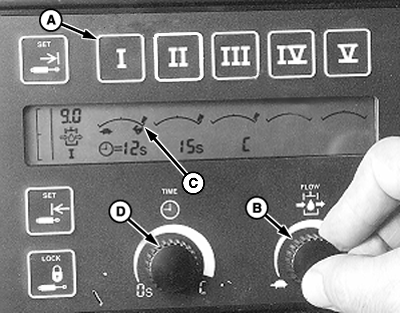
N88262-UN-13MAY108000/8020 and 9000/9020 Display
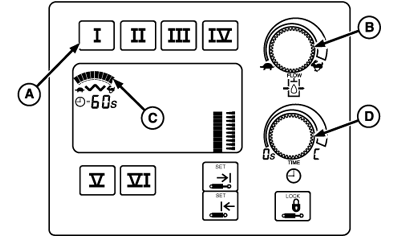
N88536-UN-21MAY108030/9030 John Deere Tractor Display
A - SCV I Selector Button, Fertilizer Opener Down Pressure Control
B - Flow Control Knob
C - Bar Graph Display
D - Time Detent Knob
FERTILIZER OPENER DOWN PRESSURE CONTROL—Press SCV I selector button (A) and turn flow control knob (B) to rabbit position. Flow setting is shown on bar graph display (C).
-
IMPORTANT: Time knob (D) MUST ALWAYS BE set to continuous in order for openers to operate properly.
Set SCV I time knob to ”continuous” until display reads “C”.
|
OUO6061,0002886-19-20100521 |