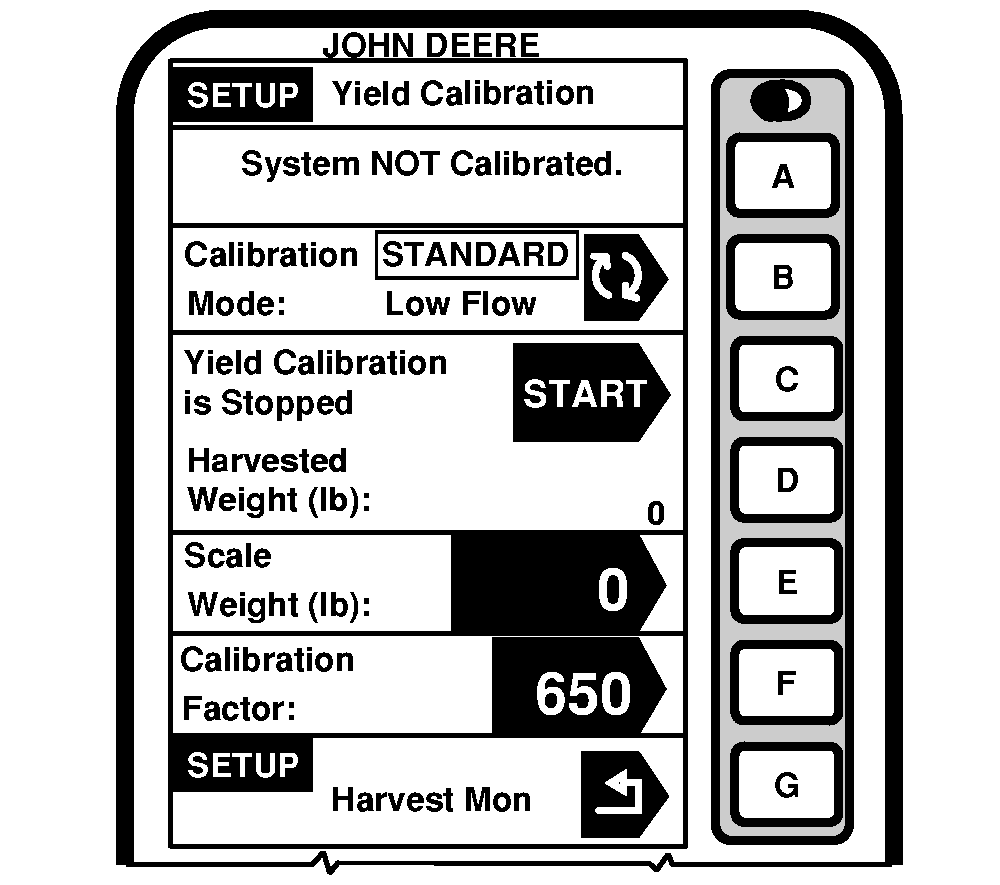
CalibrationGeneral Calibration InformationScreen: SETUP - YIELD CALIBRATION Press: SETUP >> HARVEST MONITOR >> YIELD CALIBRATION Mass flow sensor must be calibrated in order to achieve accurate grain weight measurements. Standard Calibration procedure must be performed in every crop that is harvested. In addition, optional Low Flow Compensation procedure may be performed to obtain an improved level of accuracy in situations where there are large variations in grain flow rate. The following paragraphs describe different screens that are used in calibration procedure. Calibration In Progress or System Not Calibrated CellThis section displays if mass flow sensor has been calibrated to desired crop. If system has not be calibrated a message displaying "System NOT Calibrated" will be displayed. If standard calibration has been performed a bar graph indicating flow rate sensor has been accurately calibrated. If a standard and low flow calibration has been completed, bar graph will expand to show an increased area of accuracy. |
|
OUO6050,0000749 -19-20JUN04-1/4 |
|
Calibration Mode Cell
This screen indicates whether Standard Calibration procedures or optional Low Flow procedure is to be performed. Press CALIBRATION MODE button to switch between STANDARD CALIBRATION and optional LOW FLOW CALIBRATION. Yield Calibration CellThis screen allows calibration procedure to be started or stopped. Harvested Weight CellThis screen indicates approximate weight of grain that has been harvested during calibration process. Scale Weight CellThis screen allows scale weight to be entered after a calibration run is complete (during calibration run, indicates approximate weight of grain that has been harvested). Calibration Factor CellValue shown here allows mass flow sensor to read accurately. This value will be updated automatically by Calibration procedure. This value can also be adjusted manually. |
|
OUO6050,0000749 -19-20JUN04-2/4 |
|
IMPORTANT: Before calibrating be sure that combine grain tank and unloading auger tube are empty. Be sure that wagon or truck hauling grain away from combine is empty. NOTE: Message with the following information may appear on screen: "Low Cal Flow Comp NOT required". If this message appears, flow rate during calibration was very low. Therefore, it is neither necessary nor possible to perform optional Low Flow Compensation procedure. Standard Calibration procedure is sufficient. Yield monitor system can be accurate only if operator follows correct calibration procedures. The following procedures should be performed at maximum ground speed which operator expects to run in this crop and condition, and in an area that is reasonably level and of uniform yield. 1. Press CALIBRATION MODE button to select desired calibration. 2. Press START/STOP button. Display will change to YIELD CALIBRATION IS RUNNING. 3. Begin harvesting. Weight displayed in HARVESTED WEIGHT cell should increase while harvesting. 4. Harvest known amount of grain (i.e. grain tank full, truck load, wagon load, etc.). 5. When known load is completed, stop machine and allow all harvested grain to enter grain tank. 6. Press STOP button to stop calibration. Display will change to YIELD CALIBRATION IS STOPPED. IMPORTANT: Be sure to empty grain tank completely and be certain all grain is on one vehicle (wagon or truck). 7. Have known amount of grain weighed. While waiting for scale ticket to return, you may continue by pressing RUN button. |
|
OUO6050,0000749 -19-20JUN04-3/4 |
|
8.
When scale ticket returns to combine, go to Yield Calibration Page.
9. Press SCALE WEIGHT button to change weight value. 10. Using numeric keypad, input NET WEIGHT OF GRAIN from scale ticket. IMPORTANT: Standard calibration procedure will not change data already saved. After changes are made, all harvest information collected from that point on will reflect changes. NOTE: If scale ticket weight is more than 50% higher or lower than displayed weight, system will NOT allow entry of scale weight. It is recommended that you review harvesting procedures and verify vehicle hauling grain away from combine is also following correct procedures. At that time, repeat calibration procedures. 11. Press SCALE WEIGHT button to enter new value. Calibration Factor will change automatically when grain weight is entered. |
OUO6050,0000749 -19-20JUN04-4/4 |