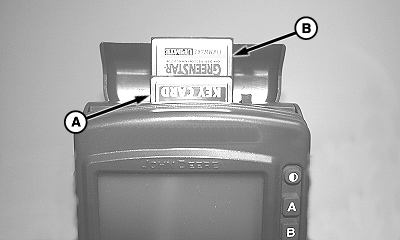
PC Data Storage Card and KeyCardIMPORTANT: Update KeyCard software via www.stellarsupport.com before the start of every season. Unload and backup previous year data from PC Data Card and clean-up card in JDOffice to provide additional data storage. For Yield Mapping to function properly, setup data from JDOffice should be saved to a PC card and installed in mobile processor. (See JDOffice manual for complete data setup procedures.) NOTE: PC data card and KeyCard may be inserted in either front or rear card slot on mobile processor. KeyCard (A) is located in mobile processor while harvesting. It stores application software and product keys that unlock application software. The KeyCard will not store field data being recorded such as yield, moisture, farm, and field. PC Data Storage Card (B) is located in mobile processor while harvesting. It provides a storage medium for all yield data acquired from yield mapping system. A 32 MB PC Data Storage Card will store approximately 1000 harvesting hours of data and can be easily transported to home office to download new data. It is recommended to download every night. |
|
OUO6050,0000790 -19-10JUN04-1/1 |