Spray Rates
|
|
|
|
|
|
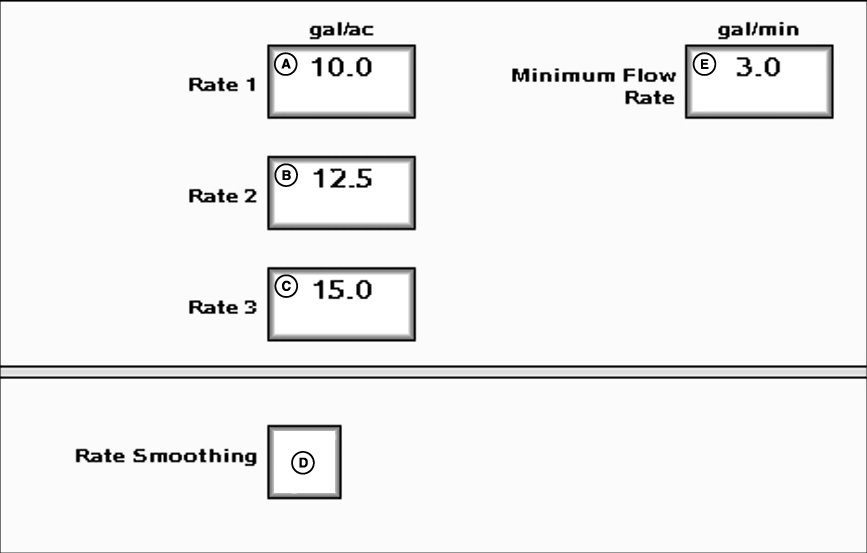
Up to three target rates may be predefined on this page by entering the value into the input box. The values entered on this page will be available on the home page. The Rate Smoothing will show the actual rate as the target rate when the actual rate is within 3% of the target rate. The Minimum Flow Rate input box may be used to enter the minimum amount of flow to maintain while spraying. If the current vehicle speed and desired spray rate demand a flow rate that is less than this value, the entered value will be applied. This feature is particularly useful in maintaining constant spray patterns when making headland turns where speed is lower than normal and changes drastically over a short period of time. |
The specified minimum flow rate applies to the entire width of the boom. If one or more sections of the boom are turned off, the actual minimum flow rate will be adjusted to account for the reduced working width. NOTE: Speeds below 1 km/h will result in all flow being shut off, regardless of the value specified for minimum flow rate. NOTE: This feature will cause over-application in areas where vehicle speed is low enough to activate the specified minimum flow rate. The degree of overapplication depends on the specified minimum rate and the speed of the vehicle. Specifying a minimum flow rate of 0 will effectively disable this feature. |
JS56696,0000033 -19-05JUL07-1/1 |