IMPLEMENT 1 tab
|
|
|
|
|
|
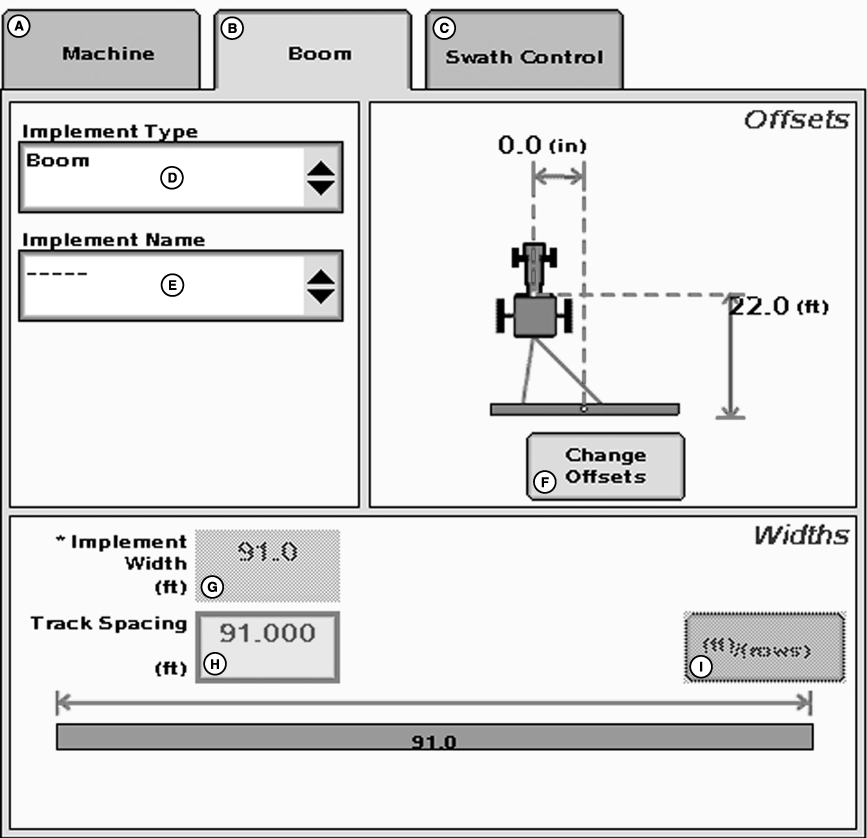
The implement tab allows setup of following: |
|
JS56696,0000075 -19-05JUL07-1/7 |
|
|
JS56696,0000075 -19-05JUL07-2/7 |
|
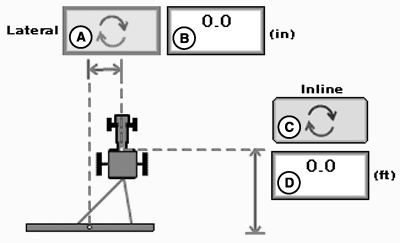
NOTE: IMPLEMENT tab will show BOOM for Sprayer, ROW UNITS for Cotton Pickers, and HEADER for Combines. NOTE: Implement width may come from controller on select controllers. NOTE: A higher degree of precision can be achieved for track spacing when track spacing is entered in by rows instead of feet. More decimal places are used in the track spacing calculation when entered in by rows versus the three decimal places allowed when entered by feet. Press the change offsets button to enter offsets. Offsets There are two different types of implement offsets: Inline and Lateral. Inline Offset › used to define the difference between the location of the receiver and the location of the implement for turning recording on/off in documentation, a coverage map, or Swath Control operation. Lateral Offset › used to eliminate skips or overlaps due to an offset implement or an implement that does not track directly behind the machine. Entering Offsets: Select the "Inline" button (C) to move direction of the offset between front or back. Select the "Lateral" button (A) to move the direction of the offset between left or right. To enter offset: Select the inbox, lateral offset (B) or inline offset (D), and enter amount of offset. If no offset is required, box should read 0. |
|
JS56696,0000075 -19-05JUL07-3/7 |
|
NOTE: IF INLINE OFFSET IS NOT SET CORRECTLY, SWATH CONTROL PRO WILL NOT FUNCTION PROPERLY. Scenario 1 Inline Implement Offset: The distance from the GPS receiver to the point where application of product is taking place (e.g. spray boom). |
JS56696,0000075 -19-05JUL07-4/7 |
|
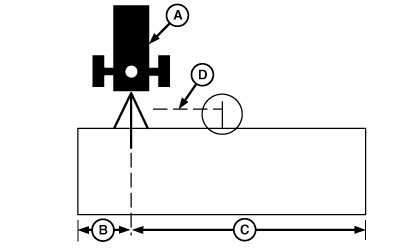
Scenario 2 Lateral Implement Offset: When an offset implement is used (such as a moldboard plow), enter distance required to move position of receiver (A) to center of implement. For example, if you are using a 6.1 m (20 ft) moldboard plow with 3.7 m (12 ft) to right of hitch and 2.4 m (8 ft) to left of hitch, enter 61 cm (24 in.) in "Lateral" offset input box. Select "Lateral" button until implement is displayed to right side of machine icon. This will position receiver 61 cm (24 in.) to right, so it is in center of implement. The following steps are used to set implement offset. 1. Measure total width of implement and enter this in Implement Width input box.2. Measure distance from center of hitch to left-end of implement (B). 3. Measure distance from center of hitch to right-end of implement (C). 4. Subtract smaller number from larger number and divide by 2. This is the amount of offset (D) that needs to be entered in the lateral offset input box. 5. Select lateral offset input box and enter amount from step 4 in cm/in. 6. Select "Lateral" offset button to toggle implement icon to larger side of implement offset. Example: If larger part of implement is to left-hand side of tow vehicle, implement icon must be toggled to left-hand side. 7. Set Track 0 (See Set Track 0). |
|
JS56696,0000075 -19-05JUL07-5/7 |
|
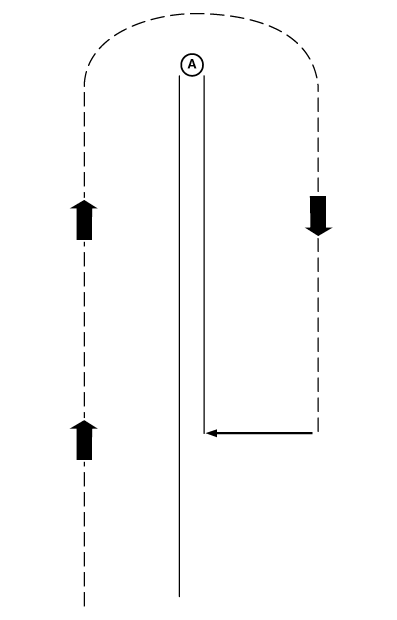
Scenario 3 Implement always pulls to one side (right or left) during field operation: This scenario typically results from improper implement setup or operation. Check implement operator's manual to ensure implement is setup and operating correctly. Before setting implement offset make sure appropriate track spacing is entered in MENU button>> IMPLEMENT softkey >> IMPLEMENT tab. If there still is skip or overlap then use following procedures. This may help eliminate or lessen effect of skips or overlaps. NOTE: Implement offset will not compensate for side draft resulting from operating on sloped or uneven terrain. To determine how much and which direction to set implement offset, use following procedures. 1. Set lateral offset to 0 (unless operating an offset implement as described in Scenario 1).2. Set track spacing and Track 0 (See Track 0 section). 3. Make a complete pass up one track and back down a consecutive track. Stop before completing second pass. There are three possible results: 1.
One pass overlapping other.
4. Measure amount of overlap or skip (A) and divide by 2. This is the amount of offset that needs to be entered in lateral offset input box. 5. Select the lateral offset input box and enter the amount of offset in cm/in. 6. Select "Lateral" offset button to move direction of offset. (See next page for examples.) a. If passes result in an overlap, select "Lateral" offset button to move implement icon towards overlap.
|
|
JS56696,0000075 -19-05JUL07-6/7 |
If two passes result in a skip, Select "Lateral" button to move implement icon away from skip.
|
|
JS56696,0000075 -19-05JUL07-7/7 |