Initial Settings

PC10169

Initial System Settings


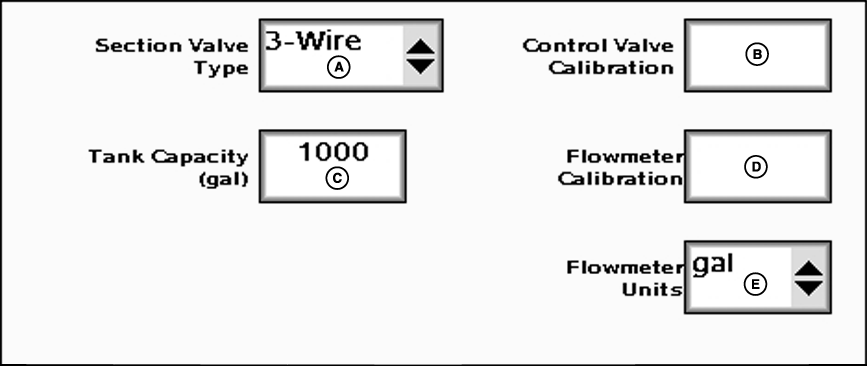
A-Section Valve Type Drop-Down Menu
B-Control Valve Calibration Input Box


C-Tank Capacity Input Box
D-Flowmeter Calibration Input Box


E-Flowmeter Units Drop-Down Menu


F-Agitator Valve Enable/Disable Box

Enter one of two valves from boom valve type drop-down: 2-wire or 3-wire. The type of valve selected may reduce the number of boom sections the GS2 can control (See Maximum Number of Sections Table).

Enter maximum volume of tank in input box labeled tank capacity.

    Enter Control Valve Calibration number provided in manual into control valve calibration input box.

    The Control Valve Calibration number is a 4 digit number used to fine tune control characteristics. The number is in the form XXYZ, and is defined as follows:

  • XX - Valve Speed.
    • The higher this value, the quicker the valve responds. If it is set too high, the actual flow rate will oscillate continuously around the target rate. If it is set too low, the target rate will never be reached.
  • Y - Output Deadband.
    • Sets the minimum speed that the valve will ramp down toward before stopping. The higher this value, the sooner the valve will become stationary.
  • Z - Control Deadband:
    • Sets how close the actual flow rate must be to the target rate to be considered acceptable. When the actual and target rates are within this range, the valve will remain stationary. A higher value allows for a larger disparity between actual and target rate.
  • Use the recommended values in the following table to initially set the Control Valve Calibration number. Evaluate machine behavior during operation, and if necessary, adjust the value to attain optimum system performance.

    Enter Flowmeter Calibration number as stamped on valve.

JS56696,0000254 -19-05JUL07-1/2


  • Most flowmeters have an attached tag indicating the recommended calibration number. Enter this number as the initial Flowmeter Calibration value. The Calibration Test may be run to attain a more accurate flowmeter calibration number (see Calibration Test).

    NOTE: If the tag is no longer attached, start with a low calibration number such as 60. Conduct a Calibration Test, and change the value accordingly from that point.

    NOTE: For RAVEN flowmeters, divide the number on the tag by 10 before entering. E.g. "2650 L" = 265 ("700 gal" = 70).

    NOTE: The number on the RAVEN tag is pulses per 10 units of fluid and the value entered needs to be pulses per unit of fluid.

    Choose unit of measurement from flowmeter units drop-down.

JS56696,0000254 -19-05JUL07-2/2