Setup Implement Sections
|
|
|
|
|
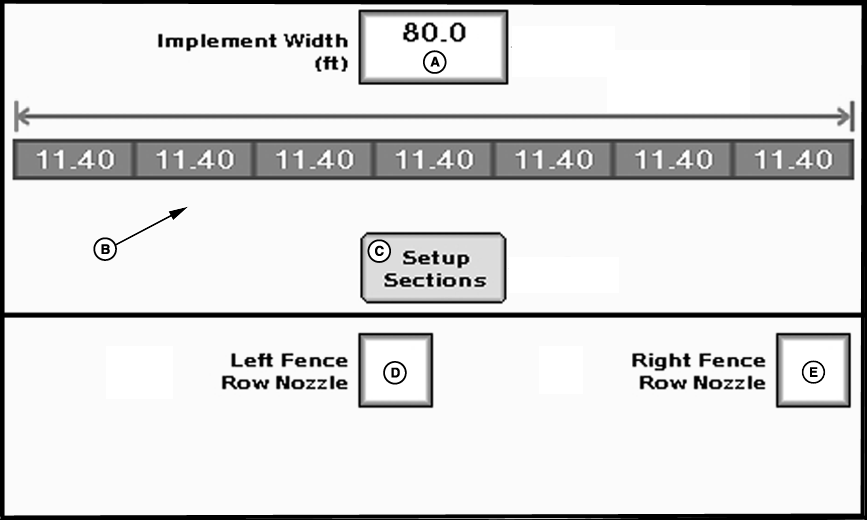
To setup implement sections:
The number of implement sections the GS2 can control may vary. |
See Maximum Number of Sections Table. |
OUMX005,0001F29 -19-05JUL07-1/3 |
Maximum Number of Implement Sections Table
| Valve Type: 3-Wire (Such as RAVEN®,TEEJET® and BANJO®) | ||
| Fence Row Valve | Agitator Valve | Maximum Number of Sections |
| No | X | 10 |
| Left | X | 8 |
| Right | X | 8 |
| Both | X | 8 |
| X = Does Not Matter | ||
| Valve Type: 2-Wire (Such as HARDI®) | ||
| Fence Row Valve | Agitator Valve | Maximum Number of Sections |
| No | No | 7 |
| Left | No | 5 |
| Right | No | 5 |
| Both | No | 5 |
| No | Yes | 4 |
| Left | Yes | 4 |
| Right | Yes | 4 |
| Both | Yes | 4 |
|
RAVEN. | OUMX005,0001F29 -19-05JUL07-2/3 |
|
|
OUMX005,0001F29 -19-05JUL07-3/3 |