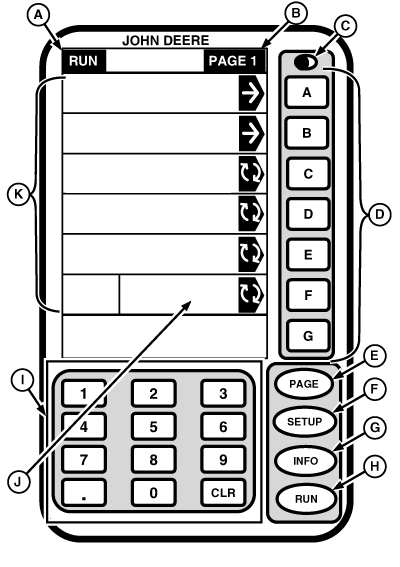
General InformationIMPORTANT: Display screens illustrated on following pages are provided for reference only. Your actual screens may appear differently due to connection of optional devices and/or software version in use. The display is a multipurpose display with easy-to-use, menu-driven commands. It has a display area with several information display cells; seven letter buttons A-G located to right of display cells; a numeric keypad; a PAGE button and three mode select buttons (SETUP, INFO, and RUN). Selected mode (SETUP, INFO, or RUN) will display in cell (A) and when PAGE appears in cell (B) additional selections or pages of information are available by pressing PAGE button. (See SETUP, INFO and RUN in this section for details on these modes). An example of each display screen is shown on following pages. Each screen contains many cells and each cell displays a specific piece of information. Each information display cell is either active or inactive. Active cells display information that can be changed and are highlighted by a black arrow. Inactive cells just display information and cannot be changed. Pressing active cell button results in one of following:
|
|
OUO6050,0001EF8 -19-28SEP06-1/2 |
|
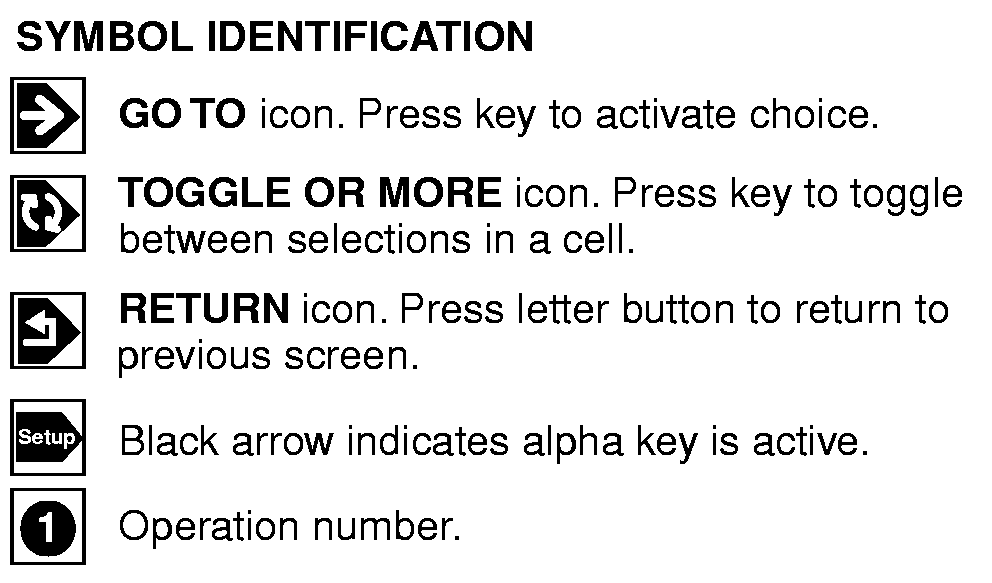
When operating display, several icons are displayed in cells. Each icon indicates type of function that can be performed in that cell. |
|
OUO6050,0001EF8 -19-28SEP06-2/2 |