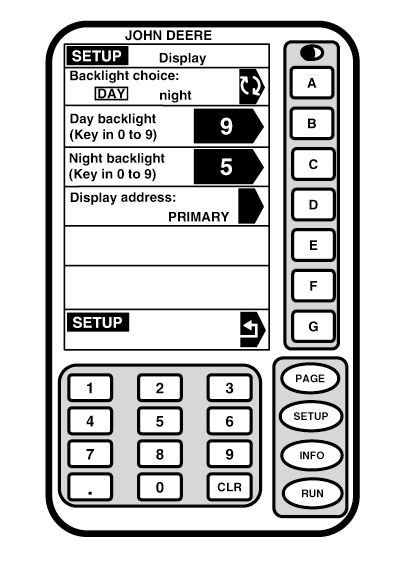
Display Backlighting and ContrastScreen: SETUP - DISPLAY Press: SETUP >> GREENSTAR DISPLAY Backlight ChoiceThis screen allows you to choose backlighting intensity level of display for both day and night backlight modes. Press letter button next to BACKLIGHT CHOICE to toggle between DAY and NIGHT. Chosen backlight will appear boxed in and in capital letters. Adjust Day BacklightPress letter button next to DAY BACKLIGHT. Using numeric keypad, enter any number from 0 to 9 for to adjust daytime intensity level. The higher the number the brighter the screen. Night BacklightPress letter button next to NIGHT BACKLIGHT to adjust level intensity. Using numeric keypad, enter any number from 0 to 9 for intensity level. The higher the number the brighter the screen. |
|
OUO6050,0001EFC -19-18OCT06-1/2 |
|
Contrast
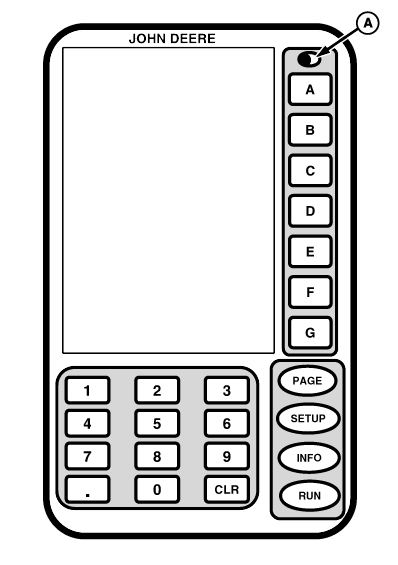
Contrast button (A) is used to adjust light level of display for visibility and clarity. Adjust contrast by pressing contrast button and holding until desired contrast level is reached. Pressing button will cause screen to lighten or darken each time button is pressed.
|
|
OUO6050,0001EFC -19-18OCT06-2/2 |