Reprogram From Yield MappingNOTE: Before operating either guidance system, verify your KeyCard has latest software available. Acquire latest version of software on Internet at www.stellarsupport.com or contact your John Deere dealer. If a newer software is installed on KeyCard than on system automatic software load should start and load newest version of software (see Automatic Software Load later in this section). When system is programmed for yield mapping and is moved onto another machine to be used for a Parallel Tracking or AutoTrac, system must be re-programmed. The following procedures show basic programming steps needed to prepare system to operate in a guidance system mode. Mobile processor, display and position receiver must be re-programmed to operate in a guidance system mode. |
OUO6050,0001EFF -19-18OCT06-1/4 |
|
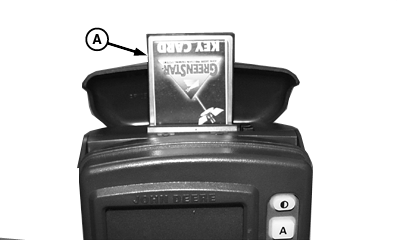
IMPORTANT: If AutoTrac/Parallel Tracking display is used with a second display on same wiring harness, AutoTrac/Parallel Tracking display address must be set to auxiliary 1 after it has been re-programmed (See Re-programming Second Display). Other display (SPRAYSTAR ™ or SEEDSTAR ™ display) address must be set to primary (See procedures in SETUP section). When re-programming a system with two displays, only one display can be connected to wiring harness at a time. Disconnect wiring harness connector from display not being re-programmed then reconnect after programming is completed. Repeat procedure on second display. NOTE: The re-programming steps shown below are for yield mapping systems with software version 6.32 or greater. (See your Yield Mapping operator's manual for re-programming information on all other versions.) NOTE: Before starting re-programming make sure PC Data Card is removed from mobile processor. 1. Install KeyCard (A) into top slot of mobile processor. 2. Turn ignition key to RUN position. 3. Press letter button next to CONTINUE to cancel following warning messages.
4. Wait for RUN - PAGE 1 screen to appear. |
|
|
SPRAYSTAR is a trademark of Deere & Company | OUO6050,0001EFF -19-18OCT06-2/4 |
|
5.
Screen:
INFO - PROGRAM
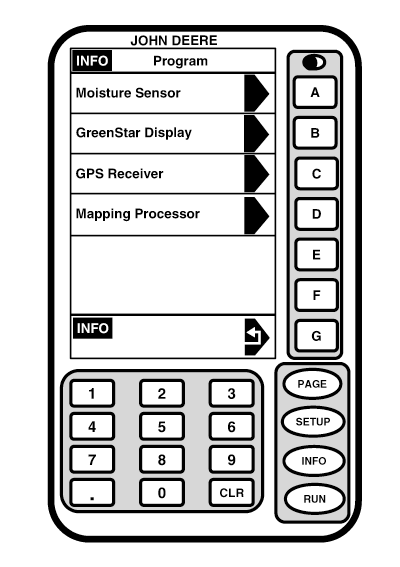
Press: INFO >> REPROGRAM >> PROGRAM TARGET >> MAPPING PROCESSOR If needed, cycle power to cancel programming. NOTE: Some displays will produce the following message: DISPLAY COMMUNICATIONS OVERLOAD-RESET DISPLAY OR CYCLE POWER. If this message appears repeat REPROGRAM >> PROGRAM TARGET and immediately after pressing letter button next to PROGRAM TARGET, press D button. Repeat steps until software version appears.
|
|
OUO6050,0001EFF -19-18OCT06-3/4 |
|
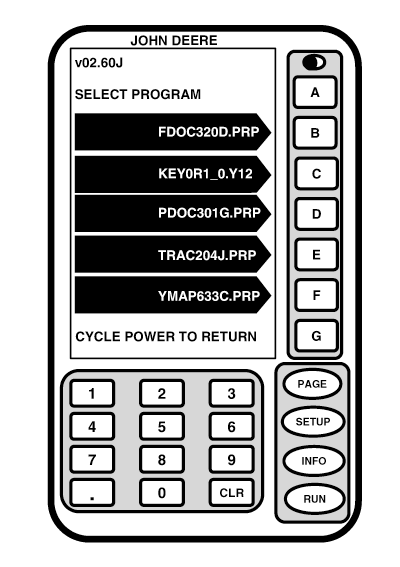
NOTE: To select correct KeyCard software, choose file starting with word KEY. (In this example KEY0R1_0.Y12 would be correct choice.) If additional language needed to be loaded (see SETUP and Load a Language later in this section). 6. Press letter button next to KEYCARD SOFTWARE VERSION or if needed, cycle power to cancel programming. 7. Wait until WARNING PROGRAMMING screen appears and follow directions on screen. DO NOT REMOVE PC CARD DO NOT REMOVE POWER 8. When programming is complete, PROGRAMMING COMPLETE screen may appear. If PROGRAMMING COMPLETE screen does appear, OK will be displayed in lower left corner. 9. Press letter button next to OK. Automatic software load will now begin.
|
|
OUO6050,0001EFF -19-18OCT06-4/4 |