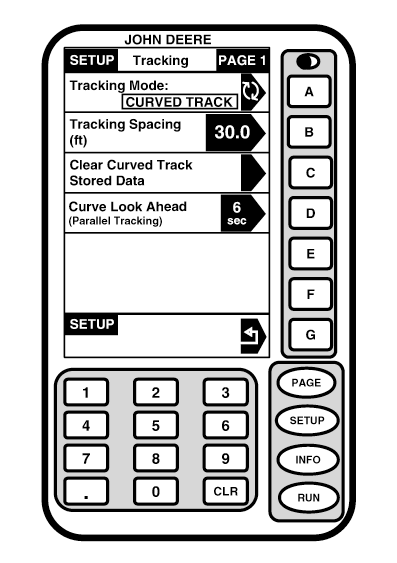
Curve TrackNOTE: To set track spacing (see Track Spacing earlier in this section). To select CURVE TRACK press letter button next to TRACKING MODE until CURVE TRACK is shown boxed in capital letters. To operate Curve Track, track spacing must be setup.
|
|
OUO6050,0001F05 -19-18OCT06-1/2 |
|
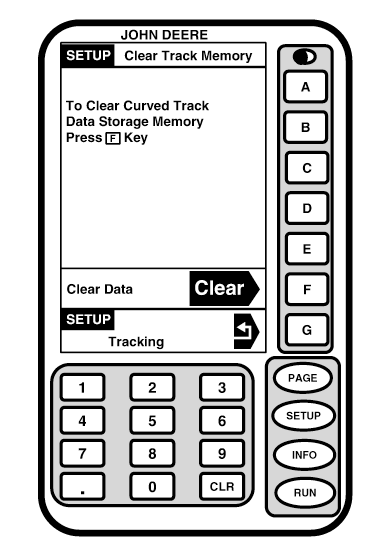
IMPORTANT: The operator must stop machine before clearing Curve Track stored data. When operating Curve Track with ACCUDEPTH ™ , after operator presses letter button next to CLEAR CURVE TRACK STORED DATA, system prompts user to cycle power to clear memory. NOTE: The amount of free memory will be displayed in RUN - TRACKING screen. When beginning a new field contents of stored data must be cleared. To clear stored data press letter button next to CLEAR CURVE TRACK STORED DATA on SETUP - TRACKING - PAGE 1 screen. SETUP - CLEAR TRACK MEMORY screen will appear. Press F button to clear memory or G button to cancel. Curve Track Look AheadThis option allows operator to change how far ahead system looks (in seconds) when operating in Curve track mode. Default setting is 6 seconds. This option is used when operating at higher speeds and operator desires system to search further ahead for line segments. When operating in Curve track mode, Curve look ahead can be changed from 0-9 seconds. Press C button, then enter desired selection using numeric key pad. |
|
|
ACCUDEPTH is a trademark of Deere & Company | OUO6050,0001F05 -19-18OCT06-2/2 |