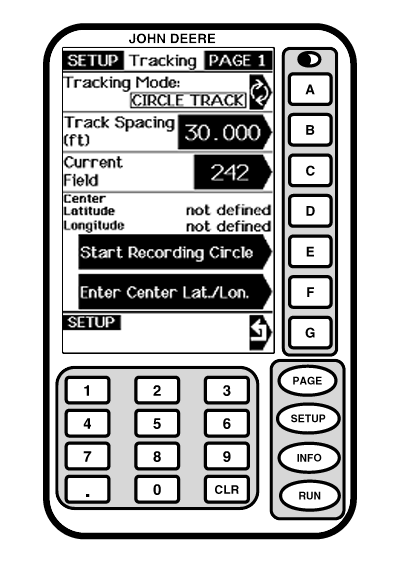
Circle TrackThe Current Field is not related to Farm/Field information in Field Doc, Combine Yield Mapping or Harvest Doc. NOTE: A PC Data Card is not required for Circle Track Operation. If no data card is present, coordinates for one circle center can be saved to the GreenStar Display. If PC data card is present, Current Field-Circle Center coordinates for Fields 1-250 are saved to the PC Card in Circle Track Mode. Circle Center coordinates assigned to that field number will remain saved until a new Circle Center is assigned to that number. To avoid overwriting Circle Center information, change the Current Field number before creating a new Center Circle. NOTE: When system is powered up, display defaults to last CURRENT FIELD number selected when it was shut down. If no CURRENT FIELD information has been stored display, it will default to selection 1.
Select Current Field 1.
Go to SETUP › TRACKING - PAGE 1 screen.
IMPORTANT: Remember to select a new number (1-250) before setting new Circle Center, and pressing CURRENT FIELD button or current coordinates for that number will be overwritten. 4. To Display a Previously Saved Field: Go to SETUP - TRACKING - PAGE 1 screen. 5. Press CURRENT FIELD button. 6. Select number field was saved on using displays numeric keypad. |
|
OUO6050,0001F06 -19-18OCT06-1/7 |
|
7.
Selections coordinates will now be shown in display cell (A).
|
OUO6050,0001F06 -19-18OCT06-2/7 |
|
Setting Circle Center Circle Center › Driving the Circle NOTE: If NOT DEFINED appears for Circle Center latitude and longitude, this means that a center has not been defined for that field yet. Follow steps below to setup Circle Center. 1.
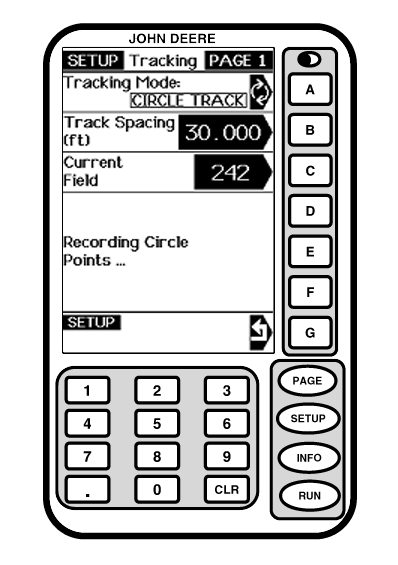
Drive machine to desired starting location in field.
|
|
OUO6050,0001F06 -19-18OCT06-3/7 |
|
3. Drive desired circle. NOTE: It is required to drive over 1/2 of the circle before you can calculate the center. The more of the circle you drive the more accurate the circle center will be.
|
|
OUO6050,0001F06 -19-18OCT06-4/7 |
|
4.
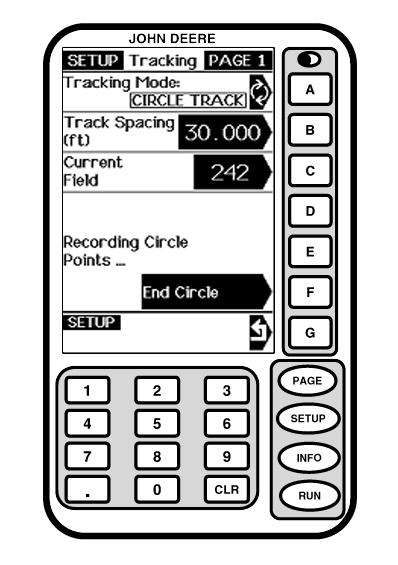
Press the "End Circle" button to complete the circle Track. This calculates the circle center.
|
|
OUO6050,0001F06 -19-18OCT06-5/7 |
|
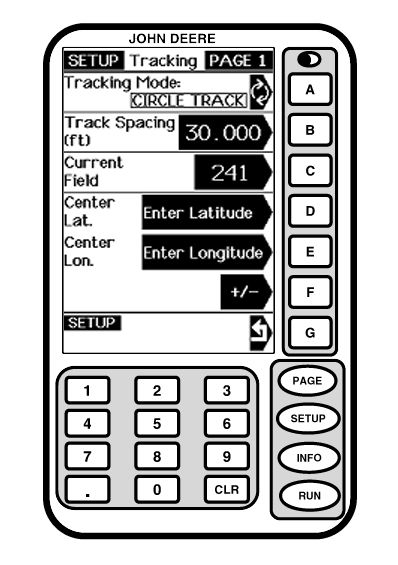
Circle Center › Entering the Circle Center 1.
Press letter button next to ENTER CENTER LAT/LON. This enters the coordinates for the center of the circle.
|
|
OUO6050,0001F06 -19-18OCT06-6/7 |
|
2.
Press letter button next to ENTER LATITUDE and enter coordinate.
This enters the circle center, and shows concentric tracks based upon the track spacing.
|
|
OUO6050,0001F06 -19-18OCT06-7/7 |