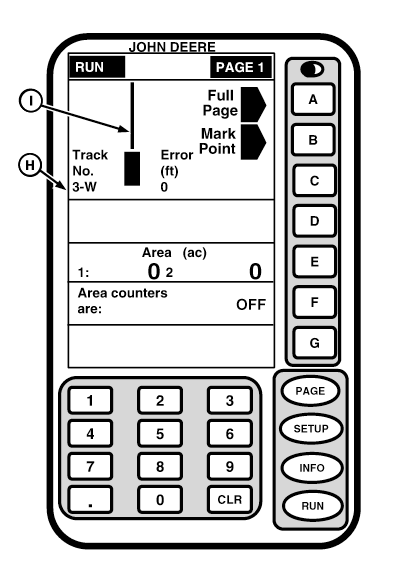
Straight TrackNOTE: When operating in straight track it is not necessary to drive tracks in a specific order, display will always show closest track. Track number (H) is displayed in lower left-hand corner of Tracking display. Track number displayed is track number closest to machine and is automatically updated by system as a new track is approached. Track number changes when machine is half way between two tracks. Each track number has a N, S, E, or W displayed. This indicates to operator that current track is north, south, east or west of Track 0. Error distance is shown in lower right-hand corner of Parallel Tracking display. This number shows how far from closest track machine is. Error number will count up until machine reaches point halfway between two tracks. After reaching mid-point error number will count down. If turning view is OFF, operator, by watching error value approach 0, will know where to turn to line up with next row. If track 0 has not been set RUN - PAGE 1 screen will display NO A-B LINE DEFINED. If differential correction is not available, both track number and error number will be 0 and navigation bar (B) will be missing. Navigation bar indicates relative position of machine to closest track. Bar will move either left or right as machine moves through field. |
|
OUO6050,0001F0E -19-18OCT06-1/2 |
|
When vehicle is moving forward, if bar moves to right of vehicle icon, steer right and bar will move to center. If bar moves to left, steer left and bar will move to center. When bar is centered on vehicle icon, machine is running on closest track. If vehicle is moving in reverse, when line is to right of icon, steer right and line will move back to center. When bar is centered on screen, machine is running on closest track. When making a turn screen will change to turning view (if turning view is active) (See Turning View later in this section) when machine is 45° from current track. Screen will change back to RUN - PAGE 1 screen when machine is 5° from parallel to closest track. If turning view is not active screen will not change and navigation bar will move all the way to one side as you drive away from current track. When machine is halfway between tracks bar will appear on opposite side of display then move towards center of display as machine approaches closest track. |
OUO6050,0001F0E -19-18OCT06-2/2 |