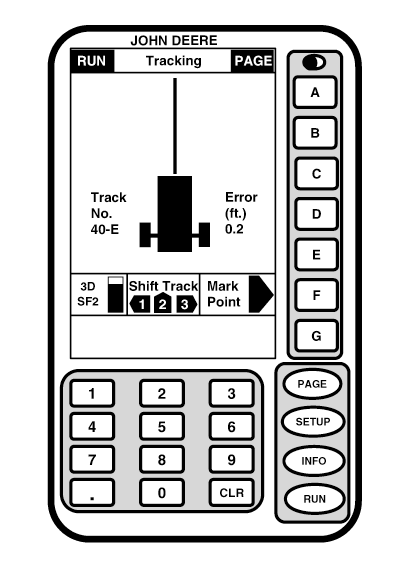
Shift TrackNOTE: Shift Track is only available in Full Page Mode. Since all tracks are based on original track 0, all tracks will be shifted by using this feature. In Circle Track mode Shift Track is not used to compensate for GPS drift. Shift Track increases or decreases the circumference of the track the vehicle is on. If the Center Shift Track button is pressed the track will be centered on the vehicles current location Shift Track allows an operator to increase or decrease the circumference of the track in hundredths of a meter (0.03) or tenths of a foot (0.1) depending on selection of unit standard. An operator may also re-center displayed line on icon. To move line to left, press 1 on numeric keypad. To move line to right, press 3 on numeric keyboard. Each time button is pressed, line will move three hundredths (0.03) of a meter or one tenth (0.1) of a foot to left or right. To re-center line on vehicle's current location press 2 on numeric keypad. Shift Track can be used to compensate for GPS drift that occurs over time. |
|
OUO6050,0001F13 -19-18OCT06-1/1 |