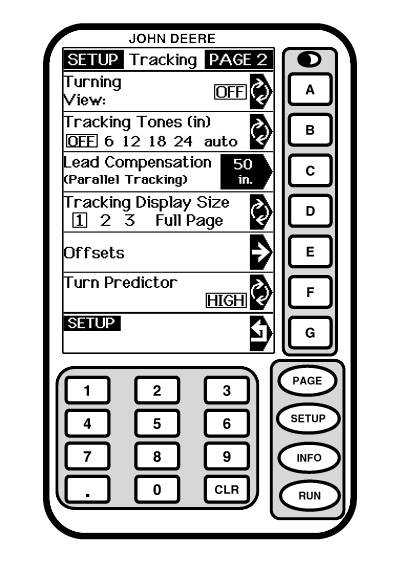
Turn PredictorParallel Tracking Turn Predictor will default to ON. It may be turned off in SETUP - TRACKING - PAGE 2 screen. TURN: OFF will be displayed on RUN full page. Once turned off, it will remain off through power cycles until manually turned back on by operator. AutoTrac NOTE: Turn Predictor will always be on for all vehicles without an operator presence switch on CAN line. Turn Predictor will default to ON after every power cycle or after every seat switch timeout. It may be turned off in SETUP - TRACKING - PAGE 2 screen. TURN: OFF will be displayed on RUN full page. Once turned off, it will remain off only until next power cycle, seat switch timeout, or if manually turned back on by operator. Whenever Display resets Turn Predictor back to ON after a seat switch timeout (operator out of seat for 7 seconds on tractors, 5 seconds on combines and sprayers), it will display a message to operator indicating that Turn Predictor has been reset to ON due to operator leaving seat. There will also be an option with caution message allowing operator to turn it back off again directly from this page. Recording Turn Points For a new turn point to be recorded for current track, vehicle must travel along track for more than 10 seconds, at a speed greater than 0.5 mph. A turn point will be recorded at point at which AutoTrac is deactivated or point in which heading error exceeds 45°. Predicting Turn Points |
|
OUO6050,0001F17 -19-18OCT06-1/6 |
|
To predict a turn, display must have at least one stored turn point that is within 8 tracks of current track and on same end of field that vehicle is moving towards. TURN: XXXX FT. (M) will be displayed on RUN full page as soon as a predicted turn point has been calculated for a newly acquired track. An advance notification, both audible (beep) and visual (TURN text flashing), will annunciate at approximately 10 seconds prior to actual predicted turn. A turn notification, both audible (two beeps) and visual (TURN text continues flashing), shall annunciate when GPS position crosses predicted turn point. The following are ways software predicts turn points: |
OUO6050,0001F17 -19-18OCT06-2/6 |
|
1.
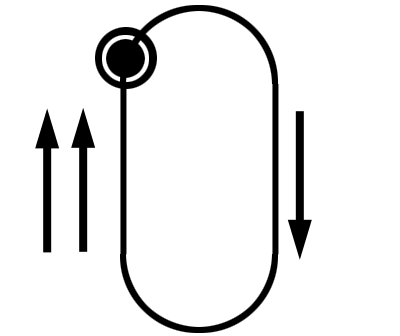
The end-point of current track if one exists.
|
|
OUO6050,0001F17 -19-18OCT06-3/6 |
|
2.
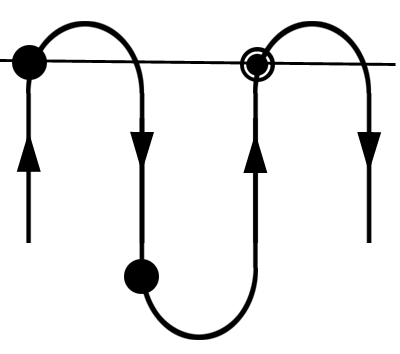
The intersection of current track and a perpendicular line through 1 stored turn point, if only 1 stored point exists within 8 closest tracks.
|
|
OUO6050,0001F17 -19-18OCT06-4/6 |
|
3.
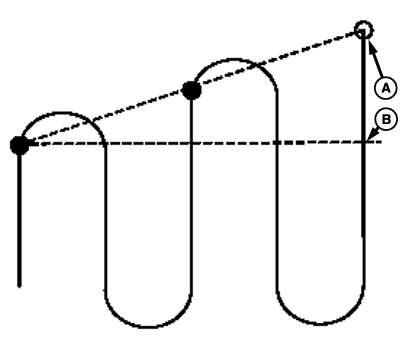
The intersection of current track and line through 2 closest stored turn points, if 2 or more stored points exist within 8 closest tracks.
|
|
OUO6050,0001F17 -19-18OCT06-5/6 |
|
4.
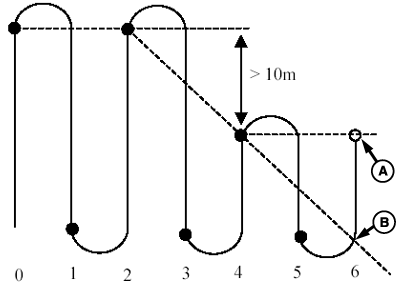
If 3 or more stored points exist within 8 closest tracks, closest point will be checked to make sure it falls within 10 meters of projected line through 2nd and 3rd closest points. If closest point is not within this distance, then turn prediction will be based only on perpendicular line through closest point.
During first 2 passes in field, and whenever vehicle moves to a new part of field that is more than 8 tracks away, TURN: NONE will be displayed on RUN full page since there are not sufficient points stored to make a turn prediction. Erasing Stored Turn Points All turn points will be erased if 1.
The operator changes fields.
|
|
OUO6050,0001F17 -19-18OCT06-6/6 |