Activating System

N63532

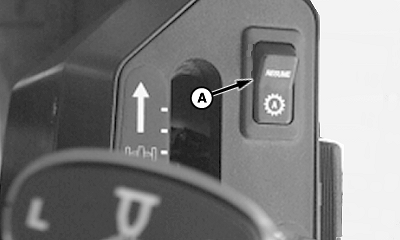
4700 Series Sprayer Resume Switch

PC7989

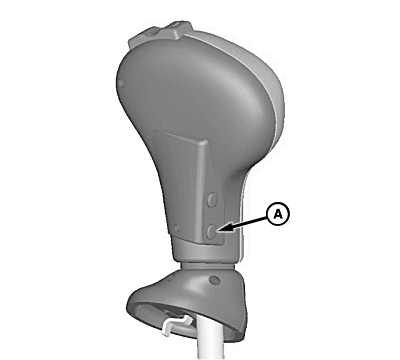
4900 Series Sprayer Resume Switch

causym CAUTION: While AutoTrac is active operator is responsible for steering at end of path and collision avoidance.
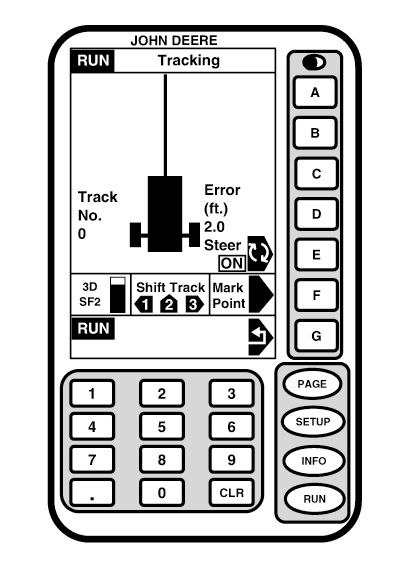
After system has been ENABLED, operator must manually change system to ACTIVE status when steering assistance is desired.

Press resume switch (A) to activate AutoTrac. This will initiate assisted steering.

In order to activate system the following criteria must be met:

  • Sprayer hydro handle is forward.
  • 4700 Series Sprayer is in 1st, 2nd, or 3rd range.

    4900 Series Sprayer is in Field Mode

  • Vehicle speed is greater than 1.5 km/h (0.9 mph).
  • Vehicle speed is less than 37 km/h (23 mph).
  • Vehicle heading is within 45° of desired track.
  • Off track error is within 40 % of track spacing.
  • Operator is seated.
  • TCM must be ON. (See Setup TCM for more information.)


A-Resume Switch
B--
C--
D--
E-Steer
F-3D, SF2 Signal / Shift Track, Mark Point
G-Return

PC9626

OUO6050,0001F22 -19-18OCT06-1/2


causym CAUTION: Always turn off (Deactivate) AutoTrac system before entering a roadway. Do not attempt to turn on (Activate) AutoTrac system while transporting on a roadway. To turn off AutoTrac, from RUN - TRACKING screen toggle STEER button until OFF is displayed. (See DEACTIVATING SYSTEM for complete details on deactivating AutoTrac.)

OUO6050,0001F22 -19-18OCT06-2/2