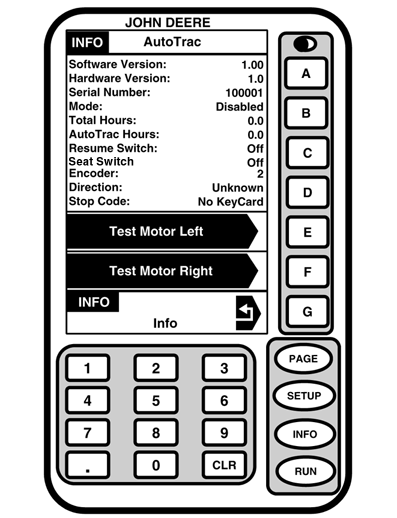
AutoTrac
-
Software Version
› Version of AutoTrac Universal software
-
Hardware Version
- Hardware Version Number
-
Serial Number
Serial number of the AutoTrac Universal
-
Mode
Status of AutoTrac: Disabled, Enabled, or Active
-
Total Hours
Hours the system has been powered up
-
AutoTrac Hours
Number of hours AutoTrac has been engaged
-
Resume Switch
Shows Resume Switch state. It will change from OFF to ON when resume switch is pressed.
-
Seat Switch
Shows OFF/ON.
-
Encoder
Represents the location of the steering wheel.
IMPORTANT:
Encoder should be within +/- 500 when front wheels are straight ahead for proper performance. If wheels are straight and encoder is outside this range operator should drive straight until encoder is within these settings.
-
Direction
Indicates vehicle direction determined by AutoTrac Universal.
IMPORTANT:
Operator must drive at least 1 mph and turn steering wheel 45° in one direction with at least SF1 signal. Direction should be determined within 3 seconds.
-
Stop code
Indicates why the system is not working or why AutoTrac disengaged. (See AUTOTRAC UNIVERSAL STOP CODES in Troubleshooting section.)
-
Test Motor Left
By pressing the "E" button the AutoTrac Universal motor will turn the steering wheel to the left. Used to test the motor to make sure it is working.
-
Test Motor Right
By pressing the "F" button the AutoTrac Universal motor will turn the steering wheel to the right. Used to test the motor to make sure it is working.
|
A-Software Version, Hardware Version, Serial Number
B-Mode, Total Hours, AutoTrac Hours
C-Resume Switch, Seat Switch, Encoder
D-Direction, Stop Code
E-Test Monitor Left
F-Test Monitor Right
G-Return
|