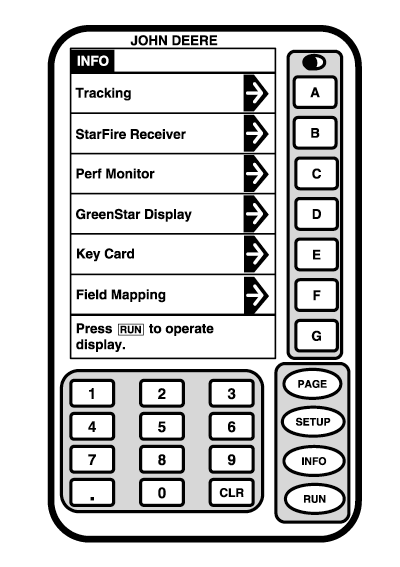
Performance MonitorScreen: INFO - PERF MONITOR Press: INFO >> PERF MONITOR
|
|
OUO6050,0001F39 -19-18OCT06-1/5 |
|
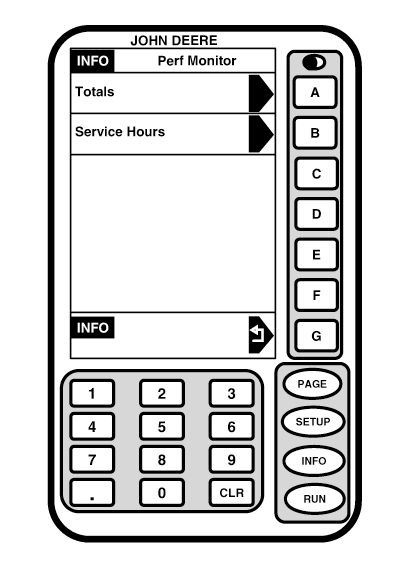
This screen allows operator access to TOTALS and SERVICE HOURS screens.
|
|
OUO6050,0001F39 -19-18OCT06-2/5 |
|
Totals
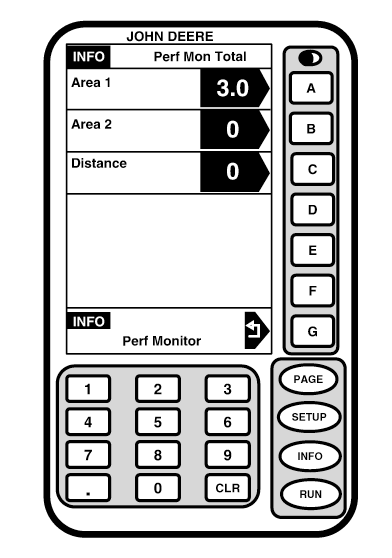
Screen: INFO - PERF MON TOTAL Press: INFO >> PERF MONITOR >> TOTALS This screens shows accumulated total machine area for counters 1 and 2 and accumulated distance. To change total area for Area 1, press letter button next to AREA 1 . Using numeric keypad, enter new area information. Press letter button next to AREA 1 again to enter and save information. To change total area for Area 2, press letter button next to AREA 2 . Using numeric keypad, enter new area information. Press letter button next to AREA 2 again to enter and save information. To change distance, press letter button next to DISTANCE . Using numeric keypad, enter new area information. Press letter button next to DISTANCE again to enter and save information. Press G button to return to INFO - PERF MONITOR screen. NOTE: If operating in a Combine, turn Performance Monitor off by going to SETUP - PERFORMANCE MONITOR screen, then toggle ON button to OFF. |
|
OUO6050,0001F39 -19-18OCT06-3/5 |
|
Service Hours
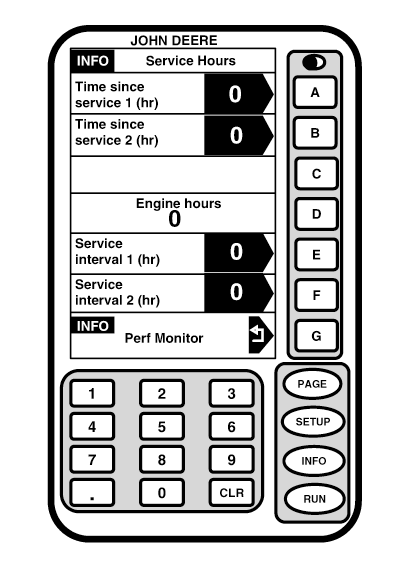
Screen: INFO - SERVICES HOURS Press: INFO >> PERF MONITOR >> SERVICE HOURS This screen shows time elapsed and interval time between machine services. This screen is used to setup predetermined service intervals for machine. Two service intervals can be entered. EXAMPLE: 50 hours is interval time required between services. Set Service Interval 1 to 50 and Time Since Service 1 to 0. As hours are accumulated, Time Since Service 1 will increase. Once Time Since Service 1 is greater than Service Interval 1 a caution will appear. To set Time Service 1: Press letter button next to TIME SERVICE 1 , then using numeric keypad enter desired amount of time. Press letter button next to TIME SERVICE 1 again to enter and save information. To set Time Service 2: Press letter button next to TIME SERVICE 2 , then using numeric keypad enter desired amount of time. Press letter button next to TIME SERVICE 2 again to enter and save information. |
|
OUO6050,0001F39 -19-18OCT06-4/5 |
|
To set Service Interval 1: Press letter button next to SERVICE INTERVAL 1 , then using numeric keypad enter desired amount of time between services. Press letter button next to SERVICE INTERVAL 1 again to enter and save information. To set Service Interval 2: Press letter button next to SERVICE INTERVAL 2 , then using numeric keypad enter desired amount of time between services. Press letter button next to SERVICE INTERVAL 2 again to enter and save information. Engine Hours This section shows accumulated engine hours of machine as determined by CCD bus.
|
|
OUO6050,0001F39 -19-18OCT06-5/5 |