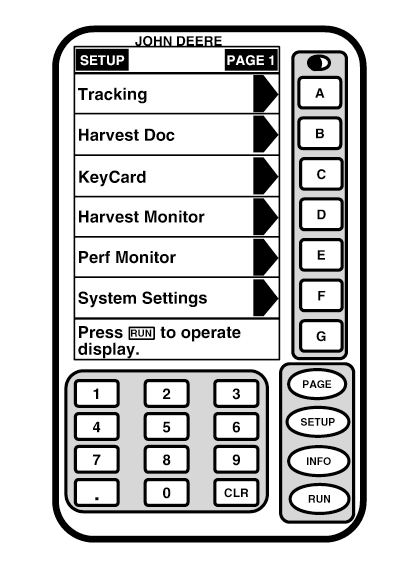
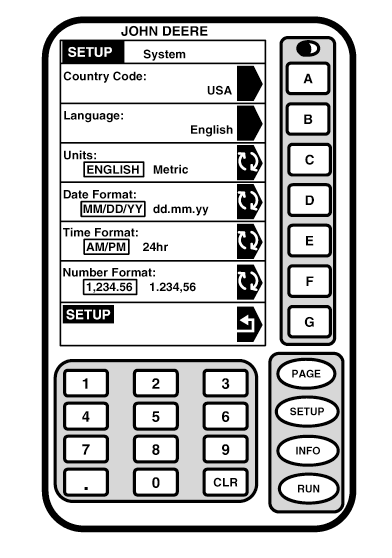
Country CodeScreen: SETUP - SYSTEM Press: SETUP >> SYSTEM SETTINGS
|
|
OUO6050,0001F78 -19-18OCT06-1/4 |
|
|
|
OUO6050,0001F78 -19-18OCT06-2/4 |
|
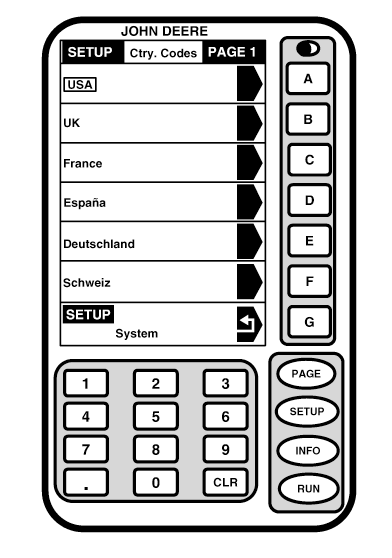
Screen: SETUP - CTRY CODES - PAGE 1 Press: SETUP >> SYSTEM SETTINGS >> COUNTRY CODE This screen shows the following countries that are currently available, with their default settings: |
|
| Country | Language | Units | Date Format | Time Format | Number Format |
|---|---|---|---|---|---|
| USA | English | English | MM/DD/YY | AM/PM | 1,234.56 |
| UK | English | Metric | DD.MM.YY | AM/PM | 1,234.56 |
| France | French | Metric | JJ.MM.AA | 24HR | 1.234,56 |
| Espana | Spanish | Metric | DD.MM.AA | 24HR | 1.234.56 |
| Deutschland | German | Metric | TT.MM.JJ | 24STD | 1.234,56 |
| Schweiz | German | Metric | TT.MM.JJ | 24STD | 1.234,56 |
| Osterrich | German | Metric | TT.MM.JJ | 24STD | 1.234,56 |
|
If desired country does not appear press PAGE button to see additional countries. Press letter button next to desired country. |
OUO6050,0001F78 -19-18OCT06-3/4 |
|
Depending on which country is selected SETUP - SYSTEM screen will display default settings for each of the cells. |
OUO6050,0001F78 -19-18OCT06-4/4 |