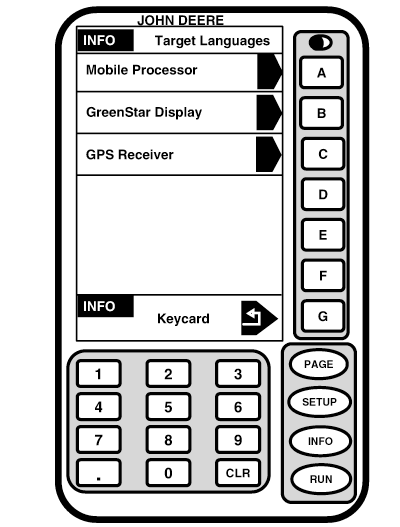
Setup and Load LanguageNOTE: Language can only be loaded from Harvest Doc, Field Doc, Auto Trac and Parallel Tracking. For this example Field Doc screens are used, selection procedures are the same for any system in use. 1. Screen: INFO - TARGET LANGUAGES Press: INFO >> KEYCARD >> TARGET LANGUAGES This screen allows operator to program a language to desired component (i.e. mobile processor). Press letter button next to desired component that you would like to program a language to. INFO - SELECT LANGUAGE screen will appear. IMPORTANT: Each component (mobile processor, display and receiver) must be individually loaded with desired language.
|
|
OUO6050,0001F7A -19-29NOV06-1/4 |
|
2.
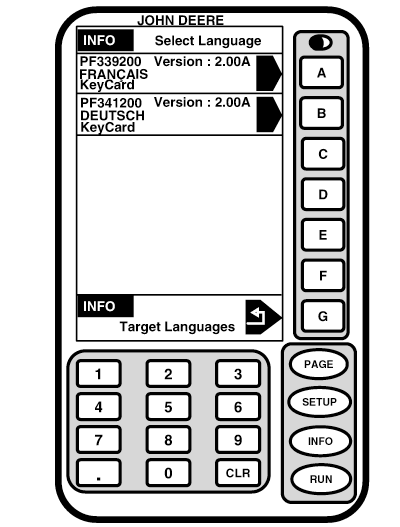
Select language(s) you want to load (i.e. French).
NOTE: Warning screen will be displayed while programming a new language. DO NOT REMOVE PC CARD, DO NOT REMOVE POWER! 3. The display will show LANGUAGE SUCCESSFULLY LOADED. Press G button to load more than one language. 4. Repeat steps 1-6 to load languages onto additional components.
|
|
OUO6050,0001F7A -19-29NOV06-2/4 |
|
5.
Screen:
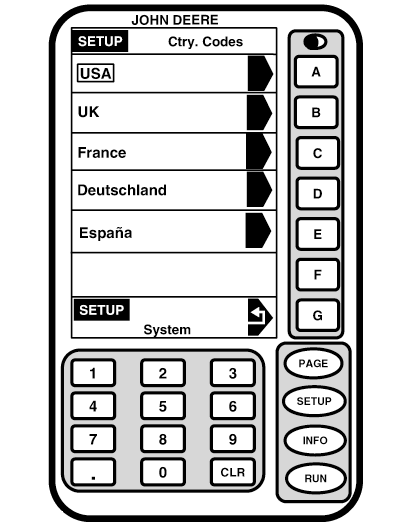
SETUP - COUNTRY CODE
Press: SETUP >> SYSTEM SETTINGS >> COUNTRY CODE: Press letter button next to desired country.
|
|
OUO6050,0001F7A -19-29NOV06-3/4 |
|
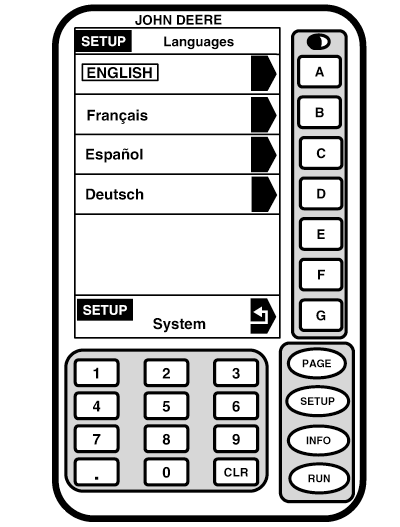
NOTE: Language choice can affect date, time and number formats and units. 6. Screen: SETUP - LANGUAGES Press: SETUP >> SYSTEM SETTINGS >> LANGUAGE: Press letter button next to desired language . If you choose a language that has not been loaded on component(s), a warning message ID233 will be displayed: THE FOLLOWING DEVICE(s) DO NOT SUPPORT THE SELECTED LANGUAGE. THEY WILL CONTINUE TO USE THE PREVIOUSLY SELECTED LANGUAGE Press CANCEL THIS MESSAGE button to load desired language to relevant component(s) as previously described.
|
|
OUO6050,0001F7A -19-29NOV06-4/4 |