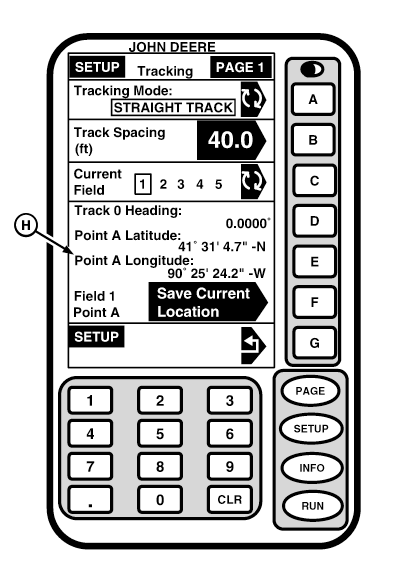
Track 0NOTE: If NOT DEFINED appears for Track 0 heading and Point A latitude and longitude, this means that a track has not been defined for that field yet. Follow steps below to setup Track 0. 1. Drive machine to desired starting location in field. 2. Press letter button next to SAVE CURRENT LOCATION. This is A point for your A-B line.
|
|
OUO6050,00020FA -19-25OCT06-1/2 |
|
3.
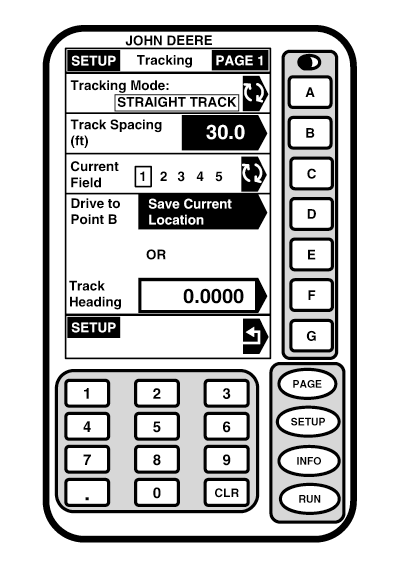
Select desired method and define point B.
NOTE: It is required to drive a longer distance than 3m (10 ft) to set point B. a. Drive machine to desired point B. Press letter button next to DRIVE TO POINT B SAVE CURRENT LOCATION. This is point B for your A-B line. A straight line is then defined through points A and B. This is your Track 0. NOTE: 0. 000 indicates north, 90. 000 east, 180. 000 south, and 270. 000 west. Save value by pressing F button again. b. Press letter button next to TRACK HEADING. Using numeric keypad, manually enter direction/heading of Track 0. You have now determined a path in which to parallel travel on the next pass(es). NOTE: If two or more vehicles are operating in same field at same time, one method of assuring that all vehicles will be using same heading is to use method b for establishing Track 0. However, if that is not possible, then have first vehicle establish a Track 0 using method A. Once Track 0 has been established, Track 0 Heading will be displayed on SETUP - TRACKING - PAGE 1 screen. The rest of the vehicles can then use Method b. to establish a Track 0 and enter heading that the first vehicle established when they set their Track 0. If operator owns a data card, A-B line can be saved in any field 6-250. This A-B line can be transported to other tractors or copied to other data cards and used in multiple tractors in same field. |
|
OUO6050,00020FA -19-25OCT06-2/2 |