CURRENT FIELDCurrent field is an important piece of AutoTrac/Parallel Tracking setup. The field number is where Track 0 information (Point A latitude and longitude and Track Heading) is stored for future use. If operator desires to perform multiple passes in same field throughout year (or years) and follow exact same passes, then they would recall corresponding field number. For example, during planting, operator sets up a Track 0 for a specific field and has Current Field set to 3. When operator came back to spray field a couple of months later, they would select Field 3 on Current Field and Track 0 that was setup during planting would be recalled. Then when they returned to Harvest field, they could select Field 3 and that same Track 0 would be recalled for harvest operation. |
OUO6050,00020FB -19-25OCT06-1/3 |
|
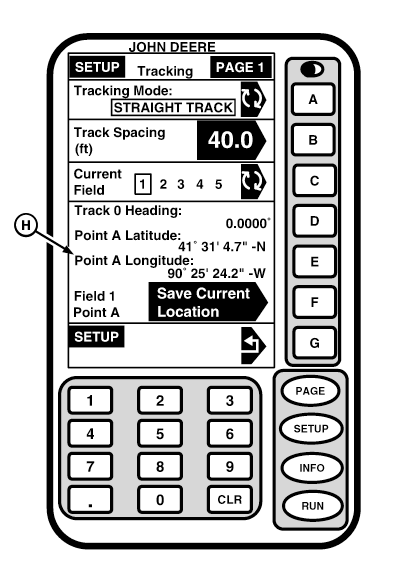
NOTE: When returning to field to perform subsequent applications, it may be necessary to use SHIFT TRACK to compensate for GPS Drift. Please see Shift Track description in Operating section for more information. The Current Field is not related to Farm/Field information in Field Doc, Combine Yield Mapping or Harvest Doc. There are two options for the Current Field - without a PC Card and with a PC Card. If a PC Card is NOT inserted in mobile processor, only 5 fields (or Track 0's) can be saved to display. If a PC Card is inserted in mobile processor, then 250 fields (or Track 0's) can be saved to PC Card. Fields 1-5 remain on display, but Fields 6-250 will be saved to PC Card. Track 0 information assigned to that field number will remain saved until a new Track 0 is setup assigned to that number. IMPORTANT: If an operator wants to save Track 0 to a specific field in Current Field cell, it is important to remember to change Current Field to a different number when setting up a new Track 0. NOTE: When system is powered up, display defaults to last CURRENT FIELD number selected when it was shut down. If no CURRENT FIELD information has been stored display, it will default to selection 1. The following procedures describe how to select current field. 1. To select a current field: Go to SETUP - TRACKING - PAGE 1 screen.2. CURRENT FIELD cell in this graphic shows selection number 1 of 5 available when not using a PC Card or 1 of 250 when using a PC Card. To select number (1-250) that you wish to save field information to: press letter button next to CURRENT FIELD, select number using displays numeric keypad, press letter button next to CURRENT FIELD. 3. Setup Track 0 as explained in TRACK 0 in this section. |
|
OUO6050,00020FB -19-25OCT06-2/3 |
|
IMPORTANT: Remember to select a new number (1-250) before setting new Track 0 heading, and pressing letter button next to CURRENT FIELD or current coordinates for that number will be overwritten. 4. To Display a Previously Saved Field: Go to SETUP - TRACKING - PAGE 1 screen. 5. Press letter button next to CURRENT FIELD. 6. Select number field was saved on using displays numeric keypad. 7. Selections coordinates will now be shown in display cell (A). |
OUO6050,00020FB -19-25OCT06-3/3 |