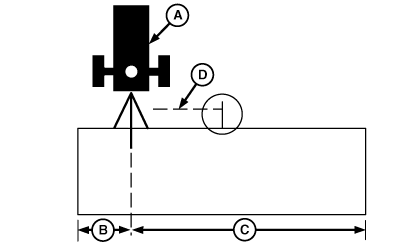
Offsets-Scenario 1Scenario 1 Offset Implement: When an offset implement is used (such as an offset disk), enter distance required to move position of receiver (A) to center of implement. For example, if you are using a 6.1 m (20 ft) offset disc with 3.7 m (12 ft) to right of hitch and 2.4 m (8 ft) to left of hitch, enter 61 cm (24 in.) in Implement Offset cell and press letter button next to IMPLEMENT until implement is displayed to right side of machine icon. This will position receiver 61 cm (24 in.) to right, so it is in center of implement. The following steps are used to set implement offset. 1. Measure total width of implement and enter this as track spacing on SETUP - TRACKING - PAGE 1 screen.2. Measure distance from center of hitch to left-end of implement (B). 3. Measure distance from center of hitch to right-end of implement (C). 4. Subtract smaller number from larger number and divide by 2. This is amount of offset (D) that needs to be entered in cell next to IMPLEMENT OFFSET. 5. Press letter button next to IMPLEMENT OFFSET and enter amount from step 4 in centimeters (inches). 6. Press letter button next to IMPLEMENT OFFSET again to save setting. 7. Press letter button next to IMPLEMENT to toggle implement icon in cell to larger side of implement offset. Example: If larger part of implement is to left-hand side of tow vehicle, implement icon must be toggled to left-hand side of cell. 8. Set Track 0 (See Set Track 0). |
|
OUO6050,000213D -19-25OCT06-1/1 |