Optimizing AutoTrac Universal Performance

Recommended Starting Adjustments

Optimizing AutoTrac Universal Performance

There are six sensitivities that can be set to optimize the performance of AutoTrac Universal.

Vehicle Type Steering Speed Acquire Sensitivity
(Adjust in Increments of 5)
Line Sensitivity - Tracking
(Adjust in Increments of 20)
Line Sensitivity - Heading
Row Crop Tractor 190 80 160 80
Track Tractor 190 80 160 80
Articulated Tractor 100 80 160 80
Sprayer 190 80 160 80
Combine 190 80 160 80
Windrower 190 80 160 80
Forage Harvester 190 80 160 80
Cotton Harvester 190 80 160 80


When operating in curves, start with the curve sensitivity equal to the optimized acquire sensitivity.

These recommended settings are a good starting point for most vehicles. Each setting can be adjusted to try and optimize performance. Operator may need to readjust line sensitivity - heading and line sensitivity - tracking for best results. Increase or decrease settings to change aggressiveness as desired. If system is not responsive enough, increase sensitivity settings. If desired performance is not achieved, see TROUBLESHOOTING section for more detail.

Step 1: Optimize Steer Wheel Speed
  • Tune speed by operating parallel to and 1.2 m (4 ft) off of the A-B Line.
  • Engage AutoTrac Universal and observe performance.
  • Tune steer wheel speed down until the system no longer disengages while acquiring the line.

OUO6050,0002376 -19-28NOV06-1/5


  • While tuning, adjust in increments of 10 between Steer wheel speeds 20 › 190 and in increments of 2 between 190-200.
  • In general, optimum performance will be achieved when steer wheel speed is set at higher settings.

OUO6050,0002376 -19-28NOV06-2/5


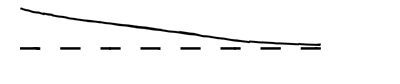
PC8797

Acquire Sensitivity Too Low

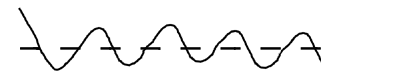
    PC8796

    Acquire Sensitivity Too High


    A-Desired Track-Broken Line
    B-Actual Track-Solid Line

    Step 2: Optimize Acquire Sensitivity
    • Tune speed by operating parallel to and 1.2 m (4 ft) off of the A-B Line.
    • Engage AutoTrac Universal and observe performance.
    • Tune Acquire Sensitivity until machine acquires the line smoothly.
    PC8999

OUO6050,0002376 -19-28NOV06-3/5


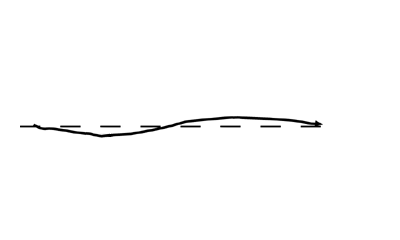
PC8794

Line Sensitivities Too Low

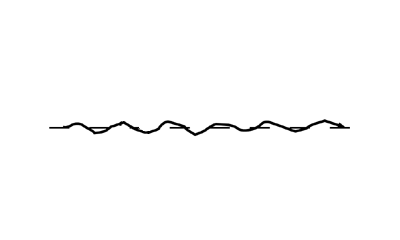
    PC8795

    Line Sensitivities Too High


    A-Desired Track-Broken Line
    B-Actual Track-Solid Line

      Step 3: Optimize Line Sensitivity

        A: Line Sensitivity-Tracking

      • Tune line sensitivity tracking while operating on the A-B line.
      • If machine wanders too far from the A-B line adjust line sensitivity › tracking higher.
      • If machine becomes unstable around A-B line adjust line sensitivity › tracking lower.

        B: Line Sensitivity-Heading

      • Tune line sensitivity heading while operating on the A-B line.
      • If the front of the machine wanders too far from the track direction adjust line sensitivity › heading higher.
      • If machine becomes unstable adjust line sensitivity › heading lower.

      NOTE: Line Sensitivities work together › If both are set too high the vehicle will become unstable. If both are set too low, the vehicle will wander around the A-B line

    PC8999

OUO6050,0002376 -19-28NOV06-4/5


PC8944

Curve Sensitivity Too Low

    PC8943

    Curve Sensitivity Too High


    A-Desired Track-Broken Line
    B-Actual Track-Solid Line

        Curve Sensitivity
        • Tune Curve Sensitivity while operating in Curve Track
        • If vehicle turns outside of the curve adjust sensitivity higher
        • If vehicle turns inside of the curve adjust sensitivity lower.
        Steer Play
        • Steer Play is only used for vehicles that have excess play in the steering system.
        • If overall performance is unacceptable due to high play in the steering system, adjust steer play setting higher until effects of loose steering system are minimized.
        • If Steer Play is set too high, system will become unstable.

        Find the combination of values that works best for the vehicle.

    PC8999

OUO6050,0002376 -19-28NOV06-5/5