TCM Calibration
|
|
|
TCM can be toggled ON or OFF by selecting TOGGLE button. When TCM is turned off, StarFire GPS message will not be corrected for vehicle dynamics or side slopes. TCM will default to ON when cycling power. |
NOTE: TCM must be turned on for AutoTrac to activate. TCM must be calibrated so receiver can determine zero degree roll angle. |
JS56696,00005A3 -19-13MAY09-1/4 |
|
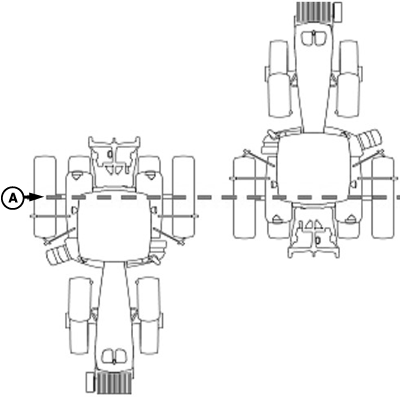
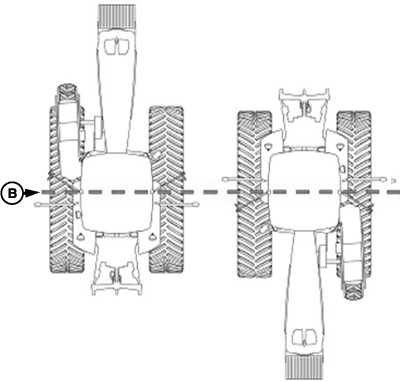
NOTE: Calibrate receiver when it is attached or reattached to machine. Receiver does not require recalibration until removed from machine and reattached. Positioning Machine during CalibrationIMPORTANT: When calibrating, it is important that TCM is at same angle when facing either direction. If roll angle is a positive 2 degrees when facing one direction, vehicle needs to be a negative 2 degrees when facing opposite direction. To position TCM at same angle it is important when turning vehicle around and facing other direction that tires are placed in correct location. Once vehicle is parked on a hard flat surface, note |
location of tires on ground. When turning around use following instructions:
|
JS56696,00005A3 -19-13MAY09-2/4 |
|
Calibration Surface
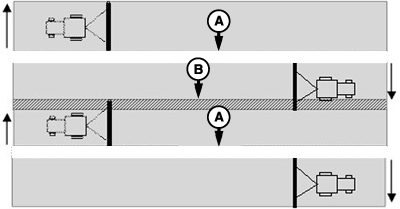
IMPORTANT: Vehicle must be on a hard, flat level surface for calibration. If TCM is not calibrated on a level surface or TCM mounting angle is not level in relation to vehicle angle (StarFire mounting bracket or vehicle cab being slightly offset, uneven tire pressures from one side to other, etc.) operator may see offset during operation. This offset could look like a consistent skip (A) or overlap (B) in pass-to-pass operation. To eliminate offset, re-calibrate on a level surface, drive down a pass, turn around and drive down same pass in opposite direction. If vehicle does not follow same pass, measure offset distance and enter in implement offset. After initial calibration of TCM, it is not necessary to calibrate again unless TCM angle in relation to vehicle has changed. For example, tire pressure has been lowered on one side of vehicle causing vehicle angle in relation to ground to change.
Calibration Procedure: 1.
Press CALIBRATION button.
|
|
JS56696,00005A3 -19-13MAY09-3/4 |
|
9.
Press ENTER button to return to SETUP tab.
|
JS56696,00005A3 -19-13MAY09-4/4 |