ACTIVATIONS tab

|
|
|
|
|
|
ACTIVATIONS tab contains the following:
|
|
JS56696,00005A5 -19-13MAY09-1/3 |
|
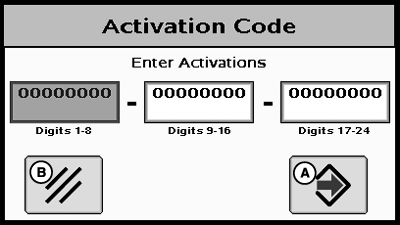
Activation Code NOTE: Activation Codes are needed to obtain SF2 Ready and RTK Activations, and SF2 license subscription. ENTER button is used to enter 24-digit codes for SF2 Ready and RTK Activations, SF2 license subscription and deactivation codes for transferring all StarFire activations and licenses mentioned above. 1. Upon selecting ENTER button an Activation Code box appears with three input boxes. NOTE: If more than 8 digits are entered into an input box, "99999999" will appear. Reselect box and type only 8 digits into input box. 2. Select first input box labeled Digits 1-8 and enter first 8 digits of 24-digit code. 3. Select second input box labeled Digits 9-16 and enter second 8 digits of 24-digit code. 4. Select third input box labeled Digits 17-24 and enter last 8 digits of 24 digit code. 5. Press ENTER button. 6. If 24-digit code is valid and entered correctly a confirmation message will appear. 7.
Deactivation Code input This input will only appear when a deactivation code has been entered following procedure listed above. It will display 6-digit deactivation codes for SF2 License, SF2 Ready and RTK activations. These codes are needed when transferring the above mentioned activations or license to another receiver.
Activation/License Status Window Displays messages when SF2 License has expired and provides user with option to use a Grace Period. |
|
JS56696,00005A5 -19-13MAY09-2/3 |
|
NOTE: Three 24 hour Grace periods are available when current license expires. This is provided to allow sufficient time for operator to renew a license. Grace period signal will be SF2 differential correction signal. Using a Grace Period 1.
Select USE 1 button from status window
|
JS56696,00005A5 -19-13MAY09-3/3 |