Vehicle
|
|
|
|
|
|
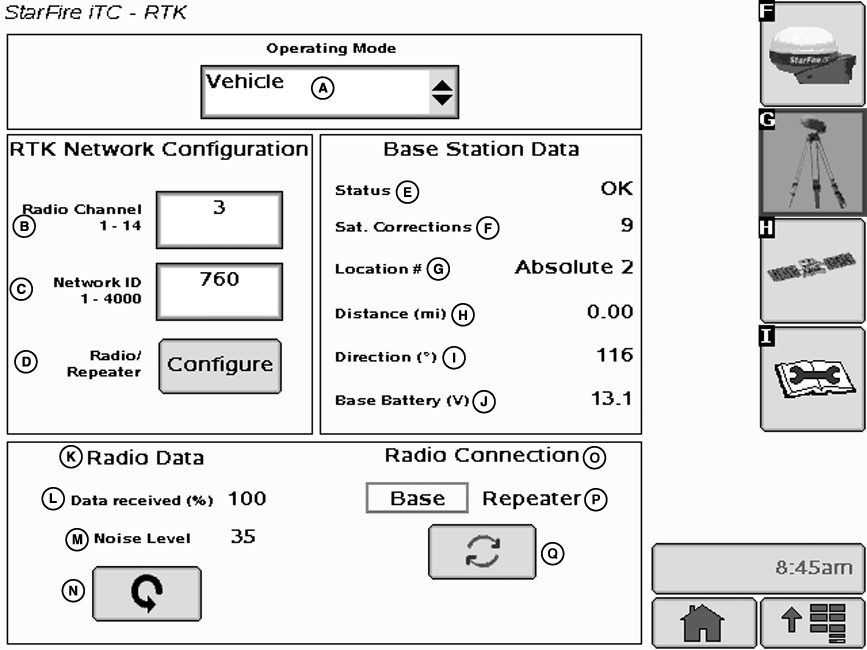
IMPORTANT: Base station receiver and vehicle receiver must be setup before operating RTK. See RTK Setup sections. Press: MENU button >> STARFIRE iTC button >> RTK softkey >> OPERATING MODE drop down box >> VEHICLE When vehicle receiver is powered-up, No GPS, No Diff will be displayed on Guidance View or home page screen until an initial position is determined. When |
base station transmits correction signal, 3D RTK will be displayed.
NOTE: If communication loss is WITHIN first hour of base station operation, Extend Mode will provide RTK accuracy for two minutes. Communication loss AFTER first hour of base station operation, Extend Mode will provide RTK accuracy for 15 minutes.
Extend Mode (RTK-X) |
JS56696,00005AF -19-13MAY09-1/2 |
|
If communication between base station and vehicle radio is lost for more than 10 seconds, vehicle receiver will automatically switch to Extend Mode and will maintain RTK accuracy for a period of time. If base station has been powered for less than one hour, Extend Mode will be available for 2 minutes. If base station receiver has been powered for more than one hour, 15 minutes of Extend Mode will be available. If base station communication is not re-established after Extend period, receiver will default to WAAS in North America, or NO DIFF where WAAS is not available. To re-establish communication move vehicle to a location where line of sight to base station can be established.
Base Station Data (Information) NOTE: Information that will be displayed when in Quick Survey Base or Absolute Base Mode. Operator can view the following:
|
Radio Data and Connection Signal Level › Level of signal which is detected at radio. Press Refresh button to refresh signal level.
Vehicle Mode › Base Station Data NOTE: Information that will be displayed when in Vehicle Mode.
Radio Data and Connection
Indicates source of correction. If there is no correction, this will toggle between base and repeater. There is also a TOGGLE button for manual toggle between two sources. |
JS56696,00005AF -19-13MAY09-2/2 |