Absolute Base Mode
|
IMPORTANT: Absolute Base Mode requires base receiver to be mounted in a rigid position. Tripod is not recommended. NOTE: Display is not required after base station receiver has been configured to operate in Absolute Survey Base Mode and RTK Radio Frequency, Network ID and Radio Channel have been set. Connect Display to Base Station. |
Press: MENU >> STARFIRE ITC button >> RTK softkey Select Absolute Base from Operating Mode drop-down box.
A 24-hour survey has to be performed and saved to a RTK Base Location (1-200). See Edit Stored Base Station Section. |
JS56696,00005B2 -19-13MAY09-1/3 |
|
|
|
|
|
|
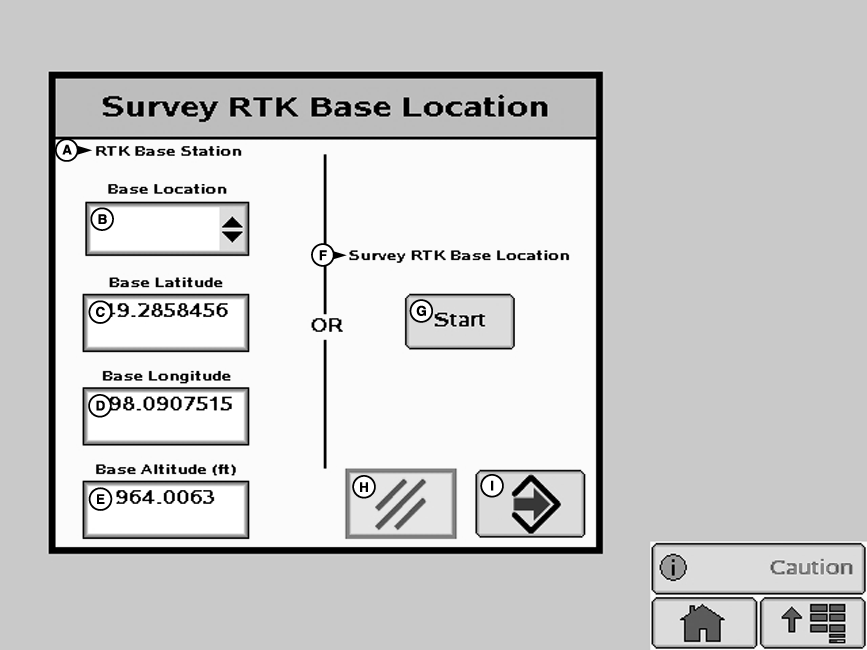
NOTE: Enter unique location number each time base station is moved to new mounting location (i.e. location 1 = West 40, location 2 = Farm Shop). Edit Stored RTK Base: Allows operator to setup Absolute Base Station Locations and conduct 24-hour survey or enter in known location coordinates. Unknown Coordinates: Press START button located under Edit Stored RTK Base. After (24 hour) self survey is complete, base station coordinates will automatically be stored and associated with base location number (1 - |
200). Verify base station coordinates, Press START button located under Edit Stored RTK Base while in Absolute Base operating mode and choose base location from base location drop-down box. Start 24 hour Self Survey 1.
Press START button located under Survey RTK Base Location.
|
JS56696,00005B2 -19-13MAY09-2/3 |
|
NOTE: Display can be removed while survey is in progress. After 24 hour survey is complete, base station will automatically store surveyed coordinates and begin transmitting corrections. IMPORTANT: Manually record coordinates and elevation and store in safe location. These coordinates may be used to enter previously surveyed base station location into different receiver. NOTE: Absolute Base Mode, coordinates may be manually entered, if known from previous survey. See Known Location section below. |
Known Location Press START button located under Edit Stored RTK Base. 1.
Select desired Base Location from drop-down box (1-200)
|
JS56696,00005B2 -19-13MAY09-3/3 |